<?xml version="1.0" encoding="utf-8"?>
<feed xmlns="http://www.w3.org/2005/Atom">
    <id>https://docs.inloox.com/whats-new/</id>
    <title>InLoox Documentation Blog</title>
    <updated>2026-05-21T00:00:00.000Z</updated>
    <generator>https://github.com/jpmonette/feed</generator>
    <link rel="alternate" href="https://docs.inloox.com/whats-new/"/>
    <subtitle>InLoox Documentation Blog</subtitle>
    <icon>https://docs.inloox.com/img/favicon.ico</icon>
    <entry>
        <title type="html"><![CDATA[Views: Advanced Column Chooser]]></title>
        <id>https://docs.inloox.com/whats-new/2026/05/21/advanced-column-chooser/</id>
        <link href="https://docs.inloox.com/whats-new/2026/05/21/advanced-column-chooser/"/>
        <updated>2026-05-21T00:00:00.000Z</updated>
        <summary type="html"><![CDATA[A new column chooser with grouped categories and descriptions makes it easier to find and add columns to list views.]]></summary>
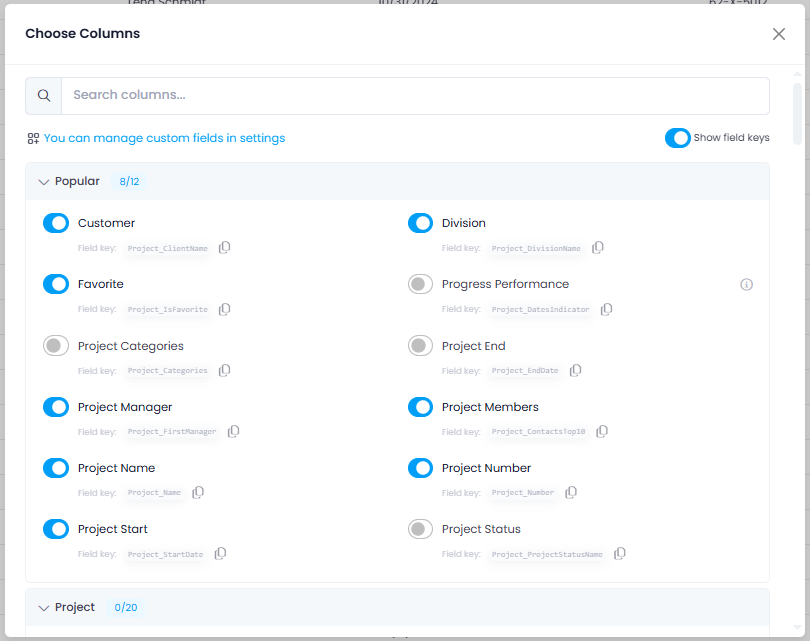
        <content type="html"><![CDATA[<p>A new advanced column chooser makes it easier to find and add columns to your list views. Hover over an existing column header and click the <strong>+</strong> icon to open it. All available columns are grouped into practical thematic categories. More complex columns include a description of the data they contain.</p>
<p>You can also display and copy database field keys directly, which is especially helpful for dashboards and reports.</p>
<p><img decoding="async" loading="lazy" alt="Advanced column chooser" src="https://docs.inloox.com/assets/images/new-column-chooser-en-b543ed417462c825ef79d711f25840a2.png" width="810" height="641" class="img_ev3q"></p>
<div class="readMore"><p>Help article: <a class="" href="https://docs.inloox.com/list-views/add-columns-to-list-views/">Add Columns to Views</a></p></div>]]></content>
        <category label="platform:web" term="platform:web"/>
        <category label="area:views" term="area:views"/>
        <category label="type:feature" term="type:feature"/>
    </entry>
    <entry>
        <title type="html"><![CDATA[Tasks: Better Visibility and Traceability for Collaborators]]></title>
        <id>https://docs.inloox.com/whats-new/2026/05/21/collaborators-improvements/</id>
        <link href="https://docs.inloox.com/whats-new/2026/05/21/collaborators-improvements/"/>
        <updated>2026-05-21T00:00:00.000Z</updated>
        <summary type="html"><![CDATA[Tasks where you are a collaborator now appear in your Workplace and task list, and collaborator changes are tracked in the activity history.]]></summary>
        <content type="html"><![CDATA[<p>Two improvements for collaborators on project tasks:</p>
<ul>
<li class=""><strong>Workplace and task list visibility:</strong> Tasks where you are listed as a collaborator now automatically appear in your Workplace under <strong>My Tasks</strong> and in the global task list. A <strong>Collaborator</strong> column is available to identify these tasks at a glance.</li>
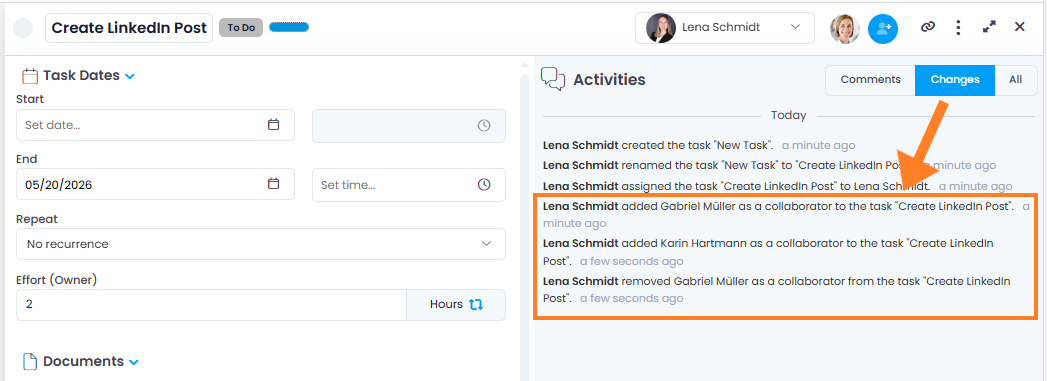
<li class=""><strong>Activity tracking:</strong> Adding or removing collaborators is now recorded in the change history of the task and on the project's Manage page — for greater transparency in collaboration.</li>
</ul>
<p>Note: You need at least the <strong>Read tasks</strong> permission to use these features.</p>
<p><img decoding="async" loading="lazy" alt="Collaborator changes in activity history" src="https://docs.inloox.com/assets/images/collaborators-in-changes-en-75eca037e78c50366a1930db874318df.png" width="1047" height="381" class="img_ev3q"></p>
<div class="readMore"><p>Help articles: <a class="" href="https://docs.inloox.com/tasks/project-tasks/collaborators/">Collaborators</a> · <a class="" href="https://docs.inloox.com/projects/activity-tracking/">Activity Tracking</a></p></div>]]></content>
        <category label="platform:web" term="platform:web"/>
        <category label="area:tasks" term="area:tasks"/>
        <category label="type:improvement" term="type:improvement"/>
    </entry>
    <entry>
        <title type="html"><![CDATA[Custom Fields: Multi-Select and Range]]></title>
        <id>https://docs.inloox.com/whats-new/2026/05/21/custom-fields-new-types/</id>
        <link href="https://docs.inloox.com/whats-new/2026/05/21/custom-fields-new-types/"/>
        <updated>2026-05-21T00:00:00.000Z</updated>
        <summary type="html"><![CDATA[Two new custom field types: Multi-Select for tagging items with multiple values and Range for selecting a value within a defined range.]]></summary>
        <content type="html"><![CDATA[<p>Two new custom field types are now available:</p>
<ul>
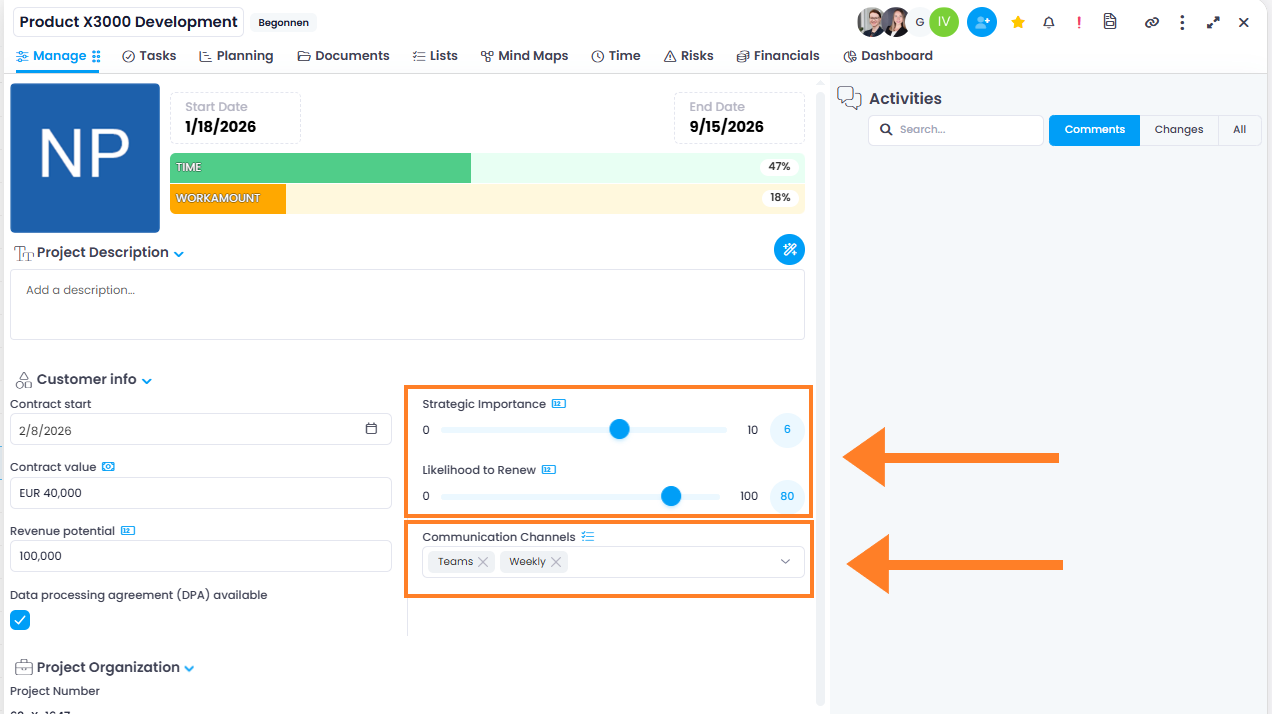
<li class=""><strong>Multi-Select</strong> — Tag items with multiple values from a predefined list. Values are displayed as tags. If the <strong>Allow to add new item</strong> option is enabled in the field settings, users can also add new values directly in the field.</li>
<li class=""><strong>Range</strong> — Select a numeric value using a slider within a defined minimum and maximum, for example as a scale or percentage.</li>
</ul>
<p><img decoding="async" loading="lazy" alt="Multi-Select and Range custom fields" src="https://docs.inloox.com/assets/images/new-custom-fields-range-multiselect-en-1ab01d6505266e305dc6760508126e76.png" width="1272" height="714" class="img_ev3q"></p>
<p>The new field types are ideal for classifications, ratings, or prioritizations and are available in all areas that support custom fields.</p>
<div class="readMore"><p>Help article: <a class="" href="https://docs.inloox.com/account-settings/custom-fields/">Custom Fields</a></p></div>
<p class="postNote">Note: Custom fields are not available in the InLoox Professional Edition.</p>]]></content>
        <category label="platform:web" term="platform:web"/>
        <category label="area:settings" term="area:settings"/>
        <category label="area:projects" term="area:projects"/>
        <category label="type:feature" term="type:feature"/>
    </entry>
    <entry>
        <title type="html"><![CDATA[Custom Fields: Better Clarity with Sections]]></title>
        <id>https://docs.inloox.com/whats-new/2026/05/21/custom-fields-sections/</id>
        <link href="https://docs.inloox.com/whats-new/2026/05/21/custom-fields-sections/"/>
        <updated>2026-05-21T00:00:00.000Z</updated>
        <summary type="html"><![CDATA[Organize custom fields into named sections for a clearer structure in the side panel.]]></summary>
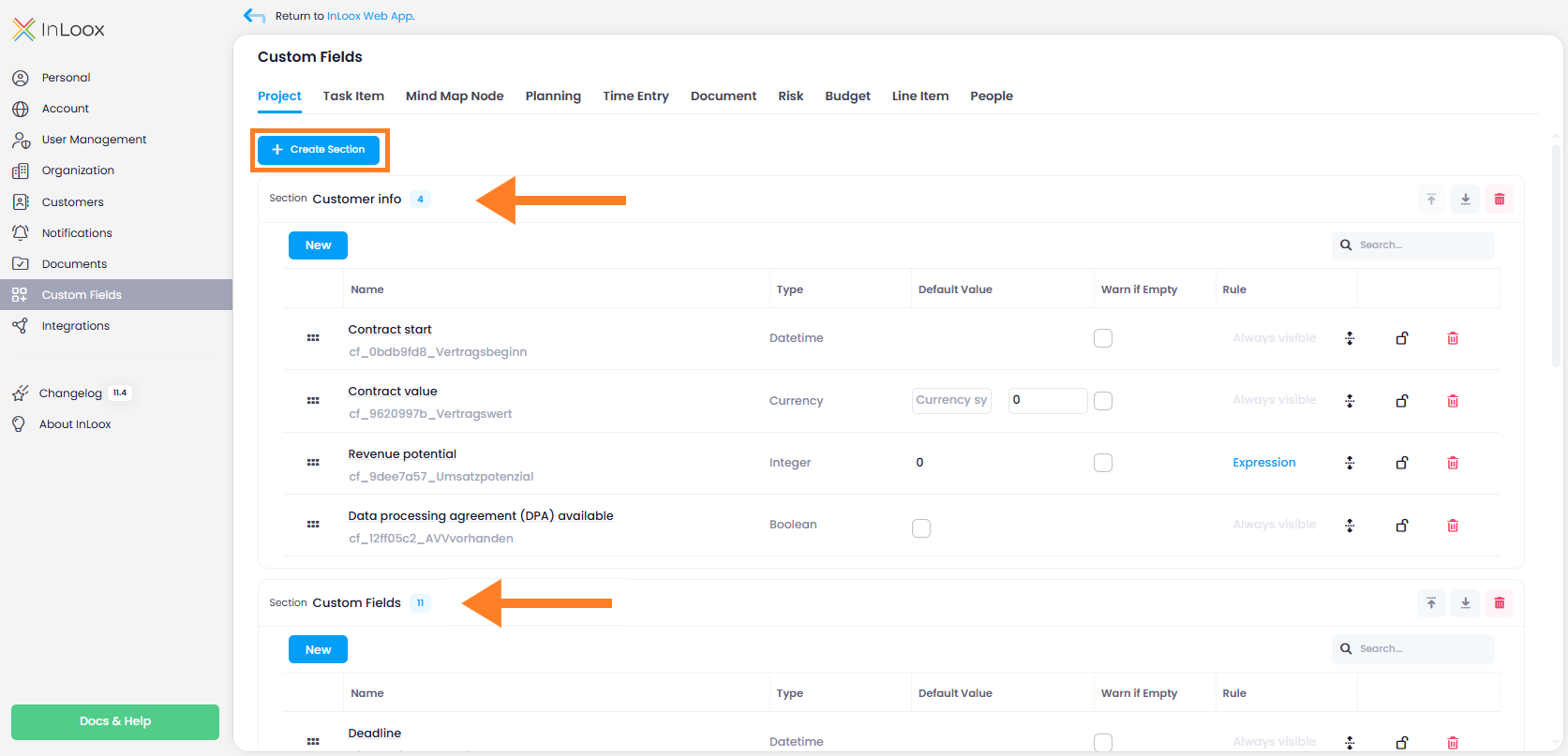
        <content type="html"><![CDATA[<p>You can now organize custom fields into named sections. Sections group related fields together under a clear heading in the side panel, making it easier to find and fill in the right fields.</p>
<p>In the Account Settings, you can create, rename, sort, and delete sections. Fields can be moved between sections and rearranged using drag and drop. Note: Administrator rights are required for this.</p>
<p><img decoding="async" loading="lazy" alt="Custom fields organized into sections" src="https://docs.inloox.com/assets/images/custom-fields-sections-en-529fddfa10ceeb23d59701ce41d0c15d.png" width="1673" height="807" class="img_ev3q"></p>
<div class="readMore"><p>Help article: <a class="" href="https://docs.inloox.com/account-settings/custom-fields/#organize-custom-fields-into-sections">Custom Fields — Sections</a></p></div>
<p class="postNote">Note: Custom fields are not available in the InLoox Professional Edition.</p>]]></content>
        <category label="platform:web" term="platform:web"/>
        <category label="area:settings" term="area:settings"/>
        <category label="area:projects" term="area:projects"/>
        <category label="type:feature" term="type:feature"/>
    </entry>
    <entry>
        <title type="html"><![CDATA[Documents: Delete Orphaned Items in Bulk]]></title>
        <id>https://docs.inloox.com/whats-new/2026/05/21/delete-orphaned-files/</id>
        <link href="https://docs.inloox.com/whats-new/2026/05/21/delete-orphaned-files/"/>
        <updated>2026-05-21T00:00:00.000Z</updated>
        <summary type="html"><![CDATA[Permanently delete all orphaned documents and folders in a project with a single action.]]></summary>
        <content type="html"><![CDATA[<p>Orphaned documents and folders — files that are no longer connected to the active SharePoint folder structure — can now be permanently deleted all at once. Open the <strong>three-dot menu</strong> in the Documents section and select <strong>Delete orphaned elements</strong>. InLoox shows a confirmation dialog with the number of affected items before deleting them.</p>
<p>This action requires administrator rights and cannot be undone.</p>
<p><img decoding="async" loading="lazy" alt="Delete orphaned elements" src="data:image/png;base64,iVBORw0KGgoAAAANSUhEUgAAAOMAAADWCAYAAAAjOTVSAAAAAXNSR0IArs4c6QAAAARnQU1BAACxjwv8YQUAAAAJcEhZcwAAGdYAABnWARjRyu0AACGpSURBVHhe7Z1dTBxXmoZ9l8vc+XbvcpfLXKw0EZIVJEuMPEJG4x85Jhqz1gRFYW3JY6+9WE4c4SyZaFubhF2kniRmZhhmvCYKYUImHsZm8WKy657MBOPF2DA4BmN+2o1pDN1N43e/r+pUd3Vxqrqa32r4Humd6a7zU+dUn7e+cwqnzo6lpWcQiURrraVcPaNjebQjnV6CSCTyJ73x/Ci/McWMItEaSm9Ep/TG3JGmAyKRyEMa0/mV3ox2ZU25Y5EKiESiQpRekWH1ZrS0hB2Dd+9BJBKthe7i7r17puh7odoBQRACgZhREAKCmFEQAoKYURACgphREAKCmFEQAoKYURACgphREAKCmFEQAsKOR4jDryYxhxksYBFLqrg3zyhbKgkknha/uB/cH79spb4Xmwr5rRafAfEUEE0A0+sgrpfr5/PkoyAz2jUPOoMH6UX9hSp2cb/ysVX7XmzK91sl0noDrZf4fF6s2IwstwjJdyXdxdkq8rrrbvW+F5vcfiuOVDrDrLe8IuSqzMhTVh1bfXrG/XNDpqbBkttvxVNHnVnWW3xeN1ZlRl5D6tBdlK0mN3R5RZsrHeu1RswnPq8bqzIjS4fugmw1uaHLK9pc6dAZZaPkhphxhXJDl1e0udKhM8lGyQ0x4wrlhi6vaHOlQ2eSjZIbYsYVyg1dXtHmSofOJH40NJDEi79ewAufJ9Exo8+TT26IGVcoN3R5RZsrHTqT5NcijlxcwI6PTb3QvajJk19uBNeMD+cQ+fIJrn85i8GHaX2eTZQburwFazaF4R7uO6nnKWIxK20eV2qm0PxftrxB0PS8+q3M3+v2SEqfz6HYQBzXv13IfI+8P4XQb+Zz8qyFdOhMkl9phFqzZnwlsqTJk19uBNOMgzG8+4MpvHsmil/Q4DtOn78Y1OTbRLmhy1uQBmYQ2jOJn1VS389H8eGBSRwvm8aVAb4hzeOLQ5No/KOm3GaKfq/zf09GovZym8+XTOLdT/Kb6vtP6Letnc18762dxHkf5QqVDp1JfGk+jav9KbQMpTGmS/chN3b8+6jeZH6lQ3dBCpHxI516gjnj+wJ6P4ris6sJzP0xirMHYrht5Z2No/nANDoGzYjR+P5jvPsKDd6SKXz4SRwxK9/IE/ziJ1P42d/TIN9DkaUnmTnXSuWGLq9/mWY7H7YPyCR6L0zhLF2PaZUeukD93G3289339f0885PH6PhoGmcpndOMqEPlPqygcj8gs1x4gvFZXbkovvjXbLnEZBxfnKA0KnP8FbrGrU/V72KTYcYoeq3vf4hS3sf4K392a9MQ3XTUb3W2PIorQ8qMZ6iNPzbbePbEDIatNq5COnQm2Si5sePBkt5kfqVDd0EKUexqFGcoGoY+msXwQ9uUZ/oJPqQfqanHnLbGvqQf/egMxtUgPV5JRp1MIvYtR1aVjwzbVEaDLzyHudlFjFOZMz+gSDOSe85C5YYur28NmIP62rQmzVD+fp4h0w4/TGC8x0yzIg8P9ONlUVwfoXJkkEbK+/Pf0BTRs9wCrvyU0mrJuLE05gbo+lPexj86pqE5ZlzEYCPdTA/F8L1X3TQVv/1v5k13+gHdaMl0rm20n2sF0qEzyUbJjYCuGdOY/u4Jfkd35DM05flZBf3Qk+bxv16wBkrCGCgffskDQ03f/mCtLdO4fkZNeWjAnqWBcn0N7rB2uaHL61t0EzpujzDLlL+fdiMP8mC3mdEecYfDKs2rHN/8aPr54UVrPfgEzUfp+p8368zIMCMdV+Lfy5hW52mTdpqqa6P6vlLp0Jkkv56h55sEdn5Ka8ZfJdBIY1Kfz1tuBP9p6iyZroZ+4Ho1bfqOfuAfkLlobfVzngoZJlOD1LaWMn5YHqS9j2mK5DXAVyY3dHl96wH1iQb/775zHKdfcPpBkqaH+ftpv+nYB3Mmn0rLGMGrnNEemlWcMteCGV16mslryDlNtZSnTfnWjM70lUqH0yD+lMIhNqL1NLVrGzxN/f4i/QivRBHhp4jKjNkfaQEddHc+W0HrkAvKoF6DlKdKtDZp/DJhHJ/rjyHEa5QgTlM58tdT33/8GL0PFo1jc4Pm1PCMcTPK00/K925YrekemtM8azC7DnTPcua1Pt+o0iZn8YsDU2i66jVNtSlPm4w21DzJrHmDb8YltHylzEimPDKwHZ6mzs7jCj80UNOeM8dzF/LTl6bpuD2CeAxS+hy7GaMoatZlPNy5lP3BVyo3dHkLUxK3P4niLE3Prfb+/KM4pvPNAOhzTj/3RNF0JjuYvQb6XL/5BFdXzngAw090OY10/n3bAyNLbmYkebUpMcizG04zn5YH34ysJQxNpXF7ZmVGZLkR/GmqRoMf0Y9kPLjRp2+E3NDlDbYWEVMPUKxja7VWC4p06EyyUXKj+Myopp3mgxtN+gbJDV3eYEs9MeUnnmTK6X5zWvzzS6t/ihkU6dCZxK/GZtIYm9en+ZEbRWfGuauPjb81mg9uNk9u6PIGXpNxdNTy3/tMNf5GMxUtYunQmSS/cteMbz94psmTX24U5TQ1CHJDl1e0udKhM0l+bcOnqcUgN3R5RZsrHTqT5Ncz9FxPqMiYwNv3t8PT1CKQG7q8os2VDp1JNkpuiBlXKDd0eUWbKx06k2yU3FiVGeWFVMvR5RVtrnRsuRdSyasalyOvagyWts2rGuUlxsuRlxgHS9viJcbyen935PX+wdCWfr2/bHyjOuaDrdT3YlMhvxVHKp46rtcakuvl+r0iooVsCScIAUHMKAgBYc3N+OzZMywkknjyJI7Hj2cQjYpE21M8/tkH7Af2RT7W1IyLi4uIzTzBg9FHxn+VLgjbHfYB+4F9wf5wIzo5sTZmZNfzicbHp9QRQRCcsD/YJ7oouSZm5IqXlpbwODajjgiC4Ab7hP2iM+SqzMgVsuYXEkYoFgTBG/YJ+8XyjsWqI6NVYSzGLxyWNaIg5IN9wn5xmpFZsRmtytLpNKamouqoIAj5YL+wb+yGXFVktJtxYmJaHRUEIR/sF6cZmVWZkRei/HTo0SN5iioIfmG/sG/sD3JWHBktR3NlqVQK4+OTKkUQhHywX9g3lhktQ67KjBxqudKxMXmSKgh+Yb+wb+xT1VVFRnY1V5ZMJsWMglAA7Bf2DfvHPlUVMwrCBqMz45pFxtHRcZUiCEI+2C/rFhnFjILgH50ZJTIKwiYgkVEQAoJERkEICBIZBSEgSGQUhIAQ/Mg434fw61XYvy+r6sY7SLodV8VcSacQn1n+btfBzxvQ1BNT3wKKS9s9iUbQVN+BQfVVCC7Bj4w60zX06c3Ix1WxZcTvoOVUNcrKzLxluw+g6oMI4uoFsjfeqUBV06j5JWjkabsn9y+jalcIN9RXIbgEPzKuBelhhF+tQm37RNasyWE0Ha1A+YWIccwyY/J+H7o6uxG574xAFJXuqrS7c8tNPz+BwZ5udPXcQdTx31O71pmMmWU6+zDi9t9g+2i7iUv77GZMziHq2NQhGY8hrjInZ/hzCtH+CNUTweCkyjs/igjV23WTro91A+AoHaXzWH3gfjsuivu1FHQUZ2QscJoabT2NkjPdy9Piw7jRSYOIPrIZy8qrUXWqGS1NDThWQdHHipTpUbQfr0L5G++hvr4B59+g6PR6G0bUwIzfDONwWQ1qKa2+vo4+V6G+29yJa6TpBMpfb6A6m3HyVaqzRdU53IZqynes/jJawrll7Phpu2f77GbsDqHknV7+lIH7fb6bP42i5QgZvKJGtekcDu+uQqilGceO1CHcdBn1VG/p0TY85OxGvZUoP3Ia9ZQWPlWD0nI6j9oN0LXfgivBj4xrME3lAXes1Xs9aJjx/T71jeDBtieMW/Qx2n4Opac6kd11cg5XTlWg+hLXeQcNZOLwgJliMHAR+/c0IEImaTlSiYZv1fHJXoTDETJQDO1vVuL8NZv5Jsmc6nx2/LTds30FmtHsk0mc6i0x+qEOgKL0wUqEuD9GvafRavuv5LJtdeu34EXwI+MacOOCPzPmrhl7cV4NYk6r7XBMta69Zw5sHpT7LjoekIyi6bUatNynAU0GKC+rxrG3mtHeH1M3C667ElVnOZJaOof9u8wydvy23bN9BZjR/Kzgskcum5FQkclvr1fxsKkmcw31/Ra8KM7IWOA0Nfl1nSNyKBzTVDcz3gqRcVomzMMKY/pIazZEO3CsNHdQAn0I7TmBzMyM1lfR/m6ET9BU0ljnmelNAzFEo3bRGszxUMZP2z3b5zTjW3YzcoReHzMaLOu34EXwI+MaTFN5TdVytAonLw1nB7v1ECRkTk29zIhvwyg/SNM1yxFRSitX0zVjQB/AsUuWGVIY+eQESt/sIKPQed9g06mk4WYcPthsRFHDQGFqj5mCeOd7KHMMfAMfbfdsn900/HnPe+iy5ovjbXQjWQ8zuvdbcCf4kXGtoAHc/lYNysoqybiVKN1djdqmO5mI42lGYqS1DvvLDqCcTF9G06/aVlveeB8ajhxAWTndFMrp/4+EM8YwH+6ocrS2DFkPafihC/+5gstUUJmDIVxxu1x52s64ts9hmpHWcyjfbeYrf7MZYVpbrr0ZPfotuFKckbHAaepakpz3eEyfTC2bZlq4lqOpHF2qNcOzfZtA0NoTZIIfGddimioIRUDwI6MgbBOCHxkFYZsgkVEQAoJrZBwaGkKhunfvHu7evYvBwUEMDAzgxo3/MSoTBCE/7Bf2DfuHfcR+Yl9JZBSEDcY1Mhr/WyBiRkFYOWJGQQgIYkZBCAhiRkEICGJGQQgIYkZBCAhiRkEICGJGQQgIYkZBCAhiRkEICGJGQQgIYkZBCAhiRkEICGJGQQgIYkZBCAhFY8ZoXxvCmbdvs8Jo6Rxe/nJfQShSisOMfWGU76pAiUbl7/SKITeCux2ol/0y1pXiMCO/lt5pxNJqHH61cEPyS3hL1D6Hhj6IqJT152HrOZxszX0Nf4Zvwitsi/ny4VJ+GbLqk+s5VgP/Bro3ngtrRhGbMYQb8TsIHzW/+93LYfmbwwnet5D3uVBfje+8Q7C1ByE0exZmcNkXMWf/Qt67cA63GmtwuJE+O/fU4LztdSg502nsuWHtl5h3T0gDzZvACWOvRduej+bei9YXj30h3dLEjOtO8ZpxVw1C7TRoWsOoKuPvdejSj9YctGY09rOwtmjj7dSqaHDTZ+MV9jWofpN3U+J1ah0O766kyKPK8yv6PfdFrET5QS7bgUGa5tXSOcqOct5m3LDP93ir7+PVKDl4zqin/S4d86o7B70ZjV2gjjSb+Qcu4vDRy+Znr30hvdLEjOtOEZvRKduuTx6wGfe/1WZEG9agtb/gcDOqykO40v4epatprzJUzj6KnK+UjE9RI/++iLn7Fy7bpckO99G2XZv3npB2TDNWN5j94ehtRrQ5dL1VSefrRdORGjQN8zHNvpADzah+g4yab89IMeO6I2a0mWWwkaIT79JkOUCzuYs1+Ot7zLp87YuoKMSMnnXn4GZGIt6J2lKaCXxinZM386nDFefU1IDTPPaMFDOuO9vSjHpDcOQ5gFKahppbvRGGocicOVPDYYT3VRk7FfveF1FRiBk9685BP0014OnpbuqTsT0d49g3Moc8e0aKGded4jVjxTmEec2oIlxORPDAzYxxijqHaaDHjb0OL2KQB6BhKI4sjn0Urb0G/e6LqGAzHs5EKQfcR/tGpp57QtpxMSOtOZuOkvHum/tH1naY089l+0K212XM6rlnpJhx3SlSM9KgvBZBS/1ltLeG0dDaQZ/bcItGUfzmZWOK1dCpf7zPZlz2p404D3SavhkDP4UbF2hQsmlUZGxqpema2nux9GAd2o31l4nffRENhttwjPKW0Y3Evr2jAbUhdJDqp/M0fGMe8twTMoNpRuefNkY+qcH+RtXQ+220HlbTb34wdIL3TKS8vC/ka9m9JI00tz0jxYzrTpGake74fR04pr4ffpXWesY0NYJ6WiPxmvDGXduDiJWSY6gUkh6Rdz33IVyXur32hVzjPSMFfxSHGZf9Cxw2nrkffQk/sbzEZuVjKdxqOIGy3RQpaP216vGki26CsE4UhxmJaJ9jfTjARiEzUiQsp7UUT12rwh1o/6DB+HteydG21U+pxIzCBlI0ZlxGegK3eobJlBFE7o/iFpu0bxQjN9msfXgo0yyhyCheMwrCFkPMKAgBQcwoCAHB1Yy8l3ihmp54hKlH45gcf4jx0Qfo/874V42CIPiA/cK+Yf+wj9hP7CuJjIKwwcg0VRACgphREAKCmFEQAoKYURACQmDMuEjnjaeAaAKYFomKWDyGeSzzmC6EQJgxkdZ3SiQqdvHY9summ5HvHrpOiERbRX4j5KabkcO5rgMi0VYRj3E/bLoZZY0o2uriMe6HTTejrvEi0VaTH8SMItEGyA9iRpFoA+QHMaNItAHyQ5GZcRS//Mcq/PjHWR373YQmn0gULPkh+GaM9eGDnyrz7T2g3g5nU+kB/EgZ82jDHYzr6liNplI4/VUKV3VpQdRICoeupXBbl7ahSqPlWhItU7o0N3GZBEIjurTilh+Ky4x5dPSDPr0Z+xLY8ekCdv7a1PO/XMAPuxcxNK/J69RYEi98nECLLi1HKVT/OonPtGkbKO7rb5OI6NI2VIt4+7cLeHtMl+Yms8zePl3aJmkgiZ1/TOnTCpAfgm9G1uwc7o3H8mjOPSo6B2ic7sBXyJi/T2Eok28Jt4dS+PQvKXw2tpQtu8yMunzPMBZN4YeUr3EqjdsztuNjZt6WoTTGMnVoNJvG1X7K27+I27PPMsfHZtIYml0y6vnsAdU7v4ShKfpua8fVSVt7VV97ZhfxGaV9OrCIsZybTrZNRvu5vqgqH6c66fOYa1mSlcbtjLukGeW8zOh2XZxmdMvH15uuC7fXeQ189Nt3XXxt/peu5+c006Dfdcjqr9f1cZEfisOMf3K+UVynE/h4WFOWpYsWNFiONy/gOE+JeOBcInP+ZwJvdyfxSgt9pqmpYVS7GV3zmdOrv/t4AS9/lcCh/12kcyyh5asFPEcFj1PeQ/9Jny+RSTQ/3hDdff/u4gJe4bKkF+jzoT5zQLT8nspRJH/+twmc7k+r9izgpVbS71V+ivovf8PnpPq4r1R+J+W3zmuY0ziv2aYdv0pgL5/r8wW8+DmVt66NZ1lqJ6Xv5Hb+KYm3qfzOi3QdHpg3DiON2mG16UWqg6/PcjN6XRe7GfPne/5XdL6vqC1/omtP5z50PYmXHG03f/PC6uLruZevPy9R6Drv+LXZJ2P6/CCJF+n6HaJ6jn9mP4e3/FBcZvyHc3hjD/1/6Qn88z/xK/0r8KN/PIfXVmJGEg/0F69TJPsmgee+sEfJNP6FfrAjA/TZZkbPfDRN3WuPoGSw52wDme/An/2BTUOGypRnLaKazHZ8OBsNp4fZnDTlpbKGGf9gmyYpM+79Tt29WTRAXviUovIT+mwYyixrppuDzWgjt6k5iau2NvV02QaUV1n6fISMeFqZzxDX15qk9amZltMHbhO1c5kZPa+LzYw+8r3Um72WRgRztJ1vtpl+F1CXcR2MfqnPNIOy0iLdZNwr6sbHN2G6MflZF/uhuMz4Ths+/gmbMYSv1bHXfhUxj63CjMaApzsq3/0svUxryxdoXWk3o2c+hxn5R7PuqJZ+SD+6/Yc1xPXTWjP3AdEiTquowuc067flt5te5ecBdeg2fdb0levgAc5t2vknW10sNo2V36OsdRMwIr+lL+h6cFvy9CF7LN91yZrRb75M3dwGj36vuC6HGadnUjhEUXRnK0VZmgEtm6q7yA/b2IxqmkplOmj9+GIXXVhe79k0xGs32+D3zOcwI0fRHV+aa40cZdaTSlNJvExRzWkujjRv0+VzM+Onmbu8mf843RS4L16GMtrkvBlQFN5pH3guZY120rT0U2d/eP1q9UHTJqcZva9L1hh+82Xq9jDjqupymtEQrTMfLeJTWprspClrC89IctKXyw/b04zOBzg0jXme0nusu1yUjMVm4IFkM6NnPmXGjEkmaYD+kr5H1dQtTpHC+NEdZqSpTojWJS9npklL5tRRTZP0ZjRvCuZDiGcY+gtNn2n62cPfvQzFbaL10On7qg3zNM3mNZF94LmVVe3c+xdbO69RZKRrOKbS7G263Ut16aapntfFZgy/+ax6Pcy4qrr4mtDSxErruZ7AS9RP87sZ/Y3nDirdTX7YPmakQWj8aYOmGPxAZG+v/U8btHaiu+dOOs55niOD7Y2oQWc3o1c+9ZDAOI96FM4PZl5UeZ+nvC9do3MaeR2iqU81DQhuF9fN65vPZsw0vRkTOG21g8RTsJC1lvM0lNkmfkDxPLeJylb3OgaeR1mrnfyww2gn3TA6VDuNNBqYO1SbXrpm5l1mRpL7dck1ht98hrzMSJ9XXBdPS6kM96ua15+qn8+pa5B50JdHfiguM77djP+oZOOdw8cXz5lmDLfhXX6o42VG36Lpx6wzcunkN58p33njNOXLmepplHNz4D9DKBMWpMLav0xe7eQ/w+iOa+S3Datqq0NrVpef38omPxSHGf8cxo/YjF7aexH/rSu71ZRjRlGxyA/FYUbSvT93o/0rd/33fX25LScxY1HKD0VjRpGomOUHMaNItAHyg5hRJNoA+UHMKBJtgPwgZhSJNkB+cDWjcyNUP1rJZqnyqkbRVpffVzVu+map8hJj0VZX0bzEWF7vL9rqKprX+zMJ2fhGtEXFY9svgTAjw3cPDueyhhQVu3gM81j2GxEtAmNGQdjuiBkFISCIGQUhIIgZBSEgiBkFISCIGQUhIIgZBSEgiBkFISCIGQUhIIgZBSEgiBkFISCIGQUhIIgZBSEgBNaMydQi5uYTeDI3j9js04LEZbgs1yEIxULgzMgGWokB3cR1iSmFYiBQZny6kMw1UnzeOLaQSBniz3zMnsevuKwgBJnAmNFuRDacVzQzoucKTCmGFIJMIMzI5rIME3+6gCXVCC84D+e1m82P1m/KmkI8GgPdI4qQTWz7/Byi0TnIbTIgZrTWiBzt/BjRgvMWGiH5XL6Z70NLfQPqW++oA1704vyuClQ1jarvxYRH26MRNNE1aPlW94qzOUSa6PqEI4iqI4XysKkGJbtCuKG+b2c23Yz2qLiSqGUv71d+z5PsqDO3myutQ1deD29RM96/jCq+Bm+0LTfc3Wbs57Qjl/FQHSoUMWOWTTcj/wmCDcIRbqUUGh35nPmJof1NGmin6lBbWoHarx2RgSJG+M0alO0+gLLXTiPc05Ed0P3NqNp3Ai13VV5mshO1+6oR6uF6Uhhpfw/VFQdQWlaF6rc60dVyDvv3hRExMkfQsK8KoaY21L5WidLSAzj8ZjNu2N2QOX8FSstrcIyiUzzzJrIUHnY2oHqfWbb89QZ0jdra79V2J5YZd1UjbO8PEXm/0rxZ2cwYvRbGMdXm8tfqKKLGVAqj6Xc414zJ0W6EXq8y+lVWcQKhzoltM4XddDNaU9TVPFyxP/zxI19T1ck2VNNAO989h64zbMrO7KCYj6C+nI69GkJrTx8inc04yd8zA3oY4YM0mEJ9Zn4ieuk0SvY0IEKGedhygvJW4mS4E5GbfWi9UG0O6sygNCNVSfk5hNsjuNFzGbVcvzXo1fnLj5NB705gsD2Ew3TDKFfnM+ovrUZ9+x08vKvqL6Wbw/1sWfe2OzDMWIPqNypR9k5v9hrE6eZC59hP/bTaFW2lPqp+3eiJqH5Vot64Afno9/02VFE/Dl/oxODoMCKXzH5VtWjatQXZdDNaBuE/XawULms3mx/lw26e5Nc8XT2NdhWZzOnrabROmt8NBi4aUzZrQBvTrz1hmBscxND6BpnzfTYLGXWf9dliDldO2QalMuOxVltU6eat1MlQVL15/nNoj6s0Itrfja5rw4ir+vc3DqsUJnvMT9tzUGZs+ZqnpNlyg2EyEk1dW9+xzKhuQI5+tZ+g9Dc7aIqbv9+DjVUo2XcRg2aige7YVkXMqGUULUdsAydN5qA7dPUl0xyG0coto1k41l1GZK1E6CZ9Nga0Nc0z851sn+MvGXLXTmae893GFxPLFBTdjLwHmzGiknIxy5oRxyGKbL7abidzXnPavj9MJk/3IbSnktqXwo2MGT36ZZwvf7+Nuqy25si6LlubTTdjIKep1oMJp9RDDHM6lhuZrGltdkCnjLs+G3pEmce8u/NApkH9Qe4TWnP95c+M5vnfQ5ftbdXJeEz9icCs/3BDH33nYzbFUz7bbsN2XtxsQFlpHVovUXRV/cmaUfUrJyKnzCn+0bZsuke/b4Xo88GLiDjbvU3+9LHpZgziAxxjCrYnhC77gLgWQpk1KI31Eq/ZLiMySmmjfQgfNQ1rH9DG9HbPCVTR9M2KqsxgI6/haE3XOWzUPdJeh3I2u08zWuff/34vovMpJO/Td1r3WWs6o35ab7b20yBOzmGw5TS1naL0t9my+dqewX5eNRXlvFZ/smZU143WpuGbEzn9qu0wo2HefhvTZVpTXrqDeDKFeH8bjpGBrbXwVmfTzRi8P23o1lyEMTWj4zxNI+J9l3GywhyYJaVVONkUxknngFZlSnbV4Yr9XpOeQFd9DUqNgViB0tca0ETffZuRyDn/rgPYf6oNI1b4UPWXkemM9N01CF2bUIk+227hOK8RWdVamrGbEekYbnxgP281ai/ROtXISeTtN9V/rQFVZao89etwPd1wbDOArcymm5Gxpqoc4QL1R38/cGRSHwsmTWVXO/+ap+jnOlgpunjtR7aatuchSXW7Q+fN8zMk49vvX+W4mtG5EaofrWSzVMYe3Yr3n8MJwurY9M1SLewPYTjaeZmG0wqNiKzVPCQShPUmENNUC+dTUTYcH+M/XbD480pMyBIjCkEnUGZkjKin1pBrIa5LpqZCMRA4M1qwgfhPECsxJpfhsmJCoZgIrBkFYbshZhSEgCBmFISAIGYUhIAgZhSEgCBmFISAIGYUhIAgZhSEgCBmFISAIGYUhIAgZhSEgCBmFISAIGYUhIAgZhSEgCBmFISAIGYUhIAgZhSEgLCuZhwbEzMKgl/YL+tmxomJKcyt9XtKBWELwj5hv6ybGR/HZjByf0ylCoLgBvuE/bJuZnz69Ckejj9SqYIguME+Yb+sqRlZXFkqlcLCwgJmZmYwPPy9yiEIghP2B/uE/cK+Yf9YXmJWZUZ29eLiIhKJhOH2aDSK+98/wN/+9kDWkIJAsA/YD+wL9gf7hP3CvrGi4qrMyFhmtEfHeDyOx48f48HoGO7dG8bAwCD6+wdw69b/Gerruy0SbWlZY53HPY9/9gH7gX3B/rBHRfsUlVmVGS1DWtFxfn7eOCGHYr4LTE5OYmJiAo8ePcL4+LhItC3E453HPY9/9gH7gX3B/nCLisyamJFdzifgRSmfcG5uDrOzs0YjWHxXYHHDRKKtLGusW2OffcB+YF+wP9gn9qi4JmZk3AxpRUmeH3ND+K4gEm0n8bjn8W9Fw3xGZNbEjE5D8pzYMqUlniuLRNtB9nHPPmA/6IzIygL8P1ctzO2sovhxAAAAAElFTkSuQmCC" width="227" height="214" class="img_ev3q"></p>
<div class="readMore"><p>Help article: <a class="" href="https://docs.inloox.com/documents/manage-folders-and-move-documents/">Manage Folders and Move Documents</a></p></div>]]></content>
        <category label="platform:web" term="platform:web"/>
        <category label="area:documents" term="area:documents"/>
        <category label="type:feature" term="type:feature"/>
    </entry>
    <entry>
        <title type="html"><![CDATA[HTML Editor for Descriptions and Comments]]></title>
        <id>https://docs.inloox.com/whats-new/2026/05/21/html-editor/</id>
        <link href="https://docs.inloox.com/whats-new/2026/05/21/html-editor/"/>
        <updated>2026-05-21T00:00:00.000Z</updated>
        <summary type="html"><![CDATA[Use a rich text editor with formatting, images, tables, and links in all description fields and comments.]]></summary>
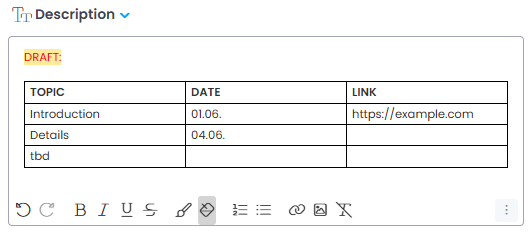
        <content type="html"><![CDATA[<p>All description fields and comments in InLoox now feature a full HTML editor. You can format text with fonts, sizes, headings, bold, italic, lists, text color, and alignment. The editor also supports inserting images, links, and tables — giving you more flexibility to structure your content clearly.</p>
<p><img decoding="async" loading="lazy" alt="HTML editor" src="https://docs.inloox.com/assets/images/html-editor-en-79b7235c21d375a79e80da128fd1610f.png" width="531" height="233" class="img_ev3q"></p>
<div class="readMore"><p>Help article: <a class="" href="https://docs.inloox.com/tasks/project-tasks/edit-task/">Edit Task</a></p></div>]]></content>
        <category label="platform:web" term="platform:web"/>
        <category label="area:tasks" term="area:tasks"/>
        <category label="area:projects" term="area:projects"/>
        <category label="type:feature" term="type:feature"/>
    </entry>
    <entry>
        <title type="html"><![CDATA[Tasks: Time Entries Directly in Task Details]]></title>
        <id>https://docs.inloox.com/whats-new/2026/05/21/linked-time-entries-in-tasks/</id>
        <link href="https://docs.inloox.com/whats-new/2026/05/21/linked-time-entries-in-tasks/"/>
        <updated>2026-05-21T00:00:00.000Z</updated>
        <summary type="html"><![CDATA[View and create time entries directly in the task side panel, with all linked entries visible at a glance.]]></summary>
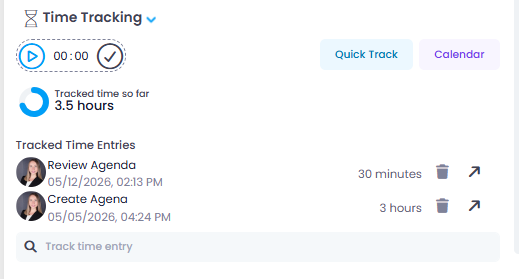
        <content type="html"><![CDATA[<p>The <strong>Time Tracking</strong> section in the task side panel now also displays all time entries linked to the task. This gives you an immediate overview of how much time has been tracked — without having to switch to the time tracking view.</p>
<p><img decoding="async" loading="lazy" alt="Linked time entries in task details" src="https://docs.inloox.com/assets/images/time-entries-in-task-en-ed28563cdd9b35056b4ed363c6f99fde.png" width="519" height="279" class="img_ev3q"></p>
<div class="readMore"><p>Help article: <a class="" href="https://docs.inloox.com/tasks/project-tasks/edit-task/">Edit Task</a> · <a class="" href="https://docs.inloox.com/time-tracking/create-and-edit-a-time-tracking-entry/">Create a Time Entry</a></p></div>]]></content>
        <category label="platform:web" term="platform:web"/>
        <category label="area:tasks" term="area:tasks"/>
        <category label="area:time-tracking" term="area:time-tracking"/>
        <category label="type:improvement" term="type:improvement"/>
    </entry>
    <entry>
        <title type="html"><![CDATA[Multi-Select in Kanban Board and Time Calendar]]></title>
        <id>https://docs.inloox.com/whats-new/2026/05/21/multi-select-kanban-and-calendar/</id>
        <link href="https://docs.inloox.com/whats-new/2026/05/21/multi-select-kanban-and-calendar/"/>
        <updated>2026-05-21T00:00:00.000Z</updated>
        <summary type="html"><![CDATA[Select and bulk-edit multiple task cards on the Kanban board and multiple time entries in the calendar view.]]></summary>
        <content type="html"><![CDATA[<p>You can now select multiple items for bulk editing in two additional views:</p>
<ul>
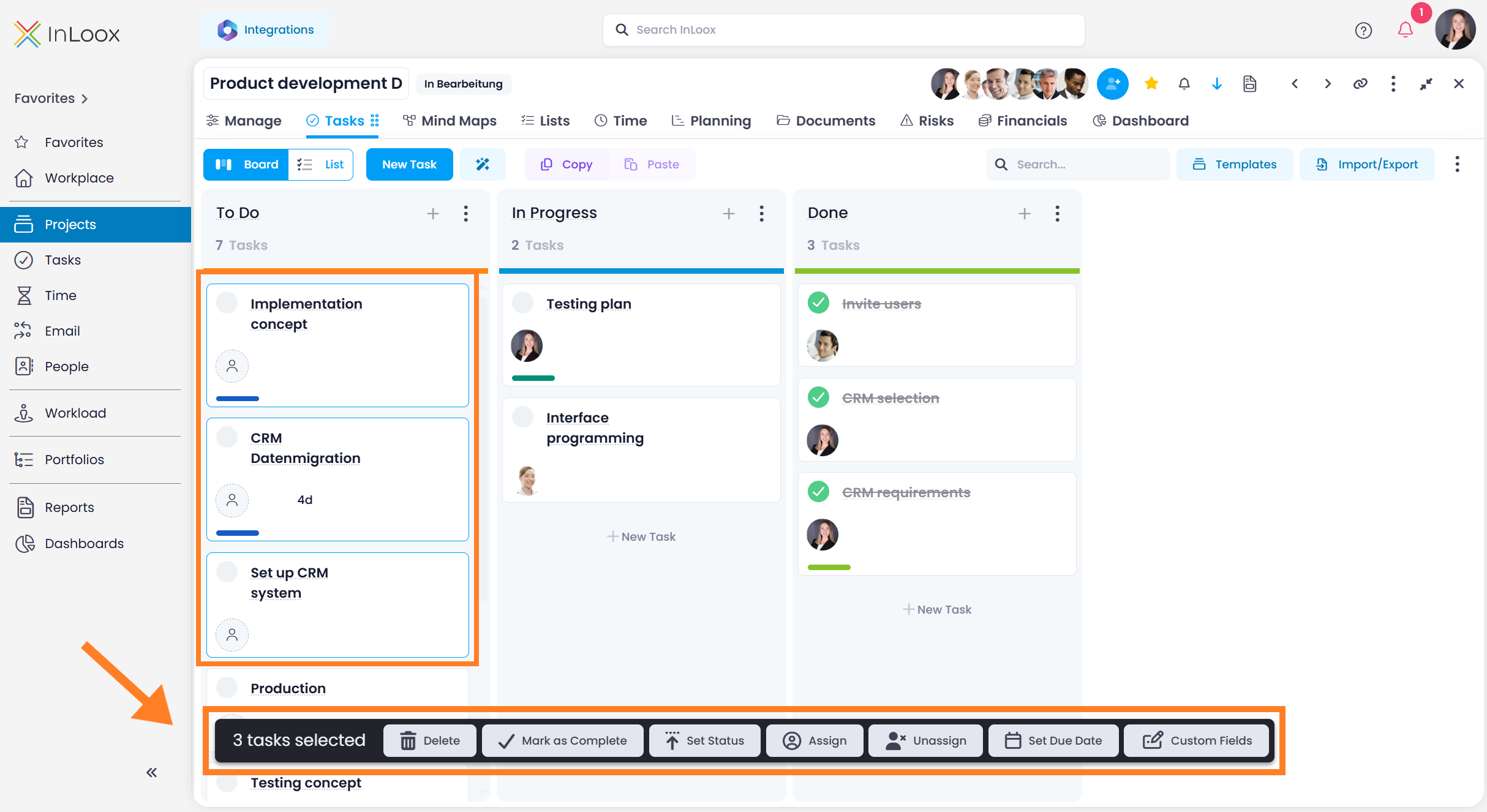
<li class=""><strong>Kanban board:</strong> Hold <strong>Ctrl</strong> or <strong>Shift</strong> and click on task cards to select them. Selected cards are highlighted with a blue border. A command bar at the bottom of the screen shows available actions such as delete, mark as complete, set status, assign a resource, or edit custom fields.</li>
</ul>
<p><img decoding="async" loading="lazy" alt="Multi-select in Kanban board" src="https://docs.inloox.com/assets/images/multiselect-kanban-board-en-ec29dd6e65626bddfe359b55bafe3af4.png" width="2428" height="1326" class="img_ev3q"></p>
<ul>
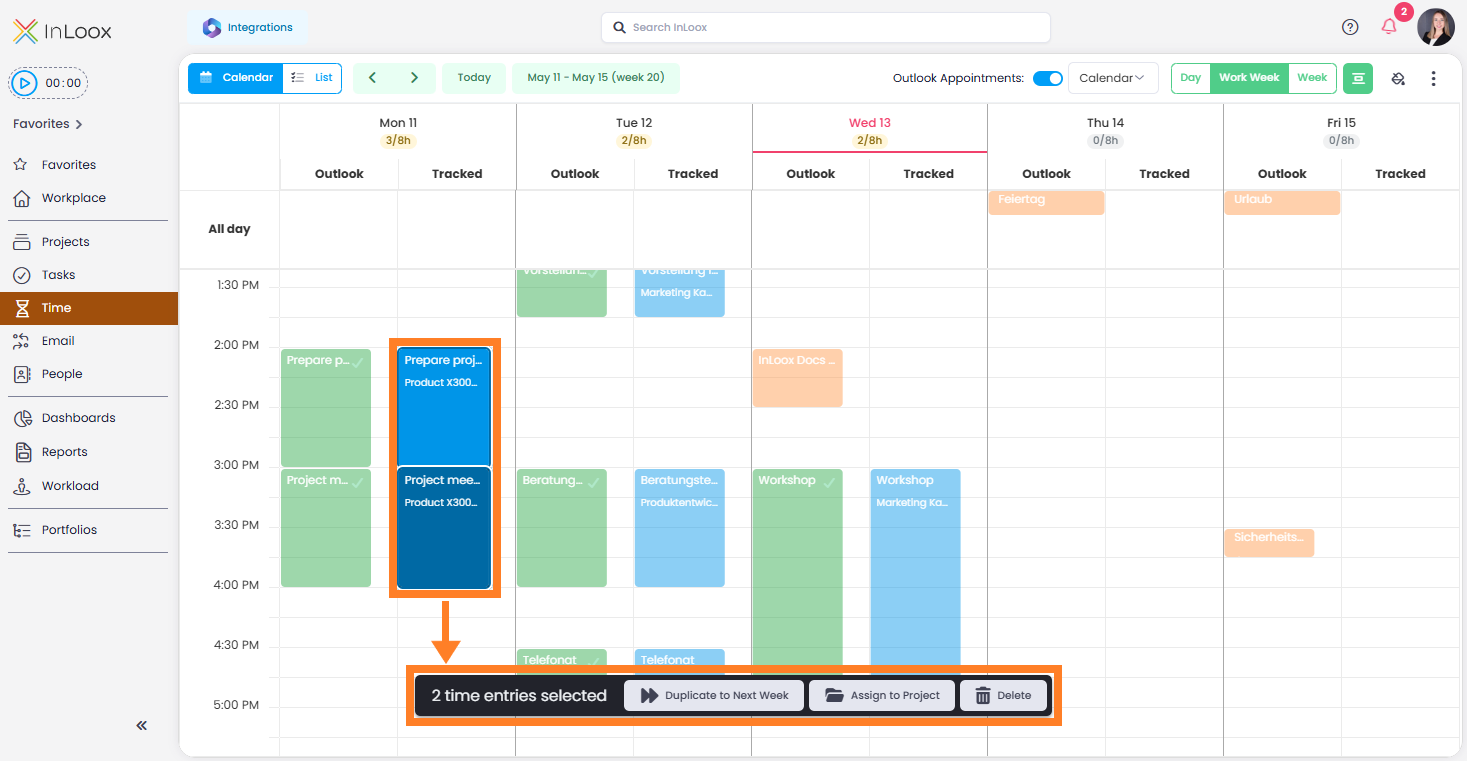
<li class=""><strong>Time tracking calendar:</strong> Select multiple time entries in the calendar view to duplicate them to the next week, track them on a project, or delete them.</li>
</ul>
<p><img decoding="async" loading="lazy" alt="Multi-select in time tracking calendar" src="https://docs.inloox.com/assets/images/multi-select-time-entries-in-calendar-view-en-666177ee0e2a47bba135ce3286b33600.png" width="1467" height="761" class="img_ev3q"></p>
<div class="readMore"><p>Help article: <a class="" href="https://docs.inloox.com/multi-editing/">Multi-Editing of InLoox Elements</a></p></div>]]></content>
        <category label="platform:web" term="platform:web"/>
        <category label="area:tasks" term="area:tasks"/>
        <category label="area:time-tracking" term="area:time-tracking"/>
        <category label="type:improvement" term="type:improvement"/>
    </entry>
    <entry>
        <title type="html"><![CDATA[My Board: Your Personal Task Board Across All Projects]]></title>
        <id>https://docs.inloox.com/whats-new/2026/05/21/my-board/</id>
        <link href="https://docs.inloox.com/whats-new/2026/05/21/my-board/"/>
        <updated>2026-05-21T00:00:00.000Z</updated>
        <summary type="html"><![CDATA[Manage your tasks across all projects on a personal Kanban board in the Workplace.]]></summary>
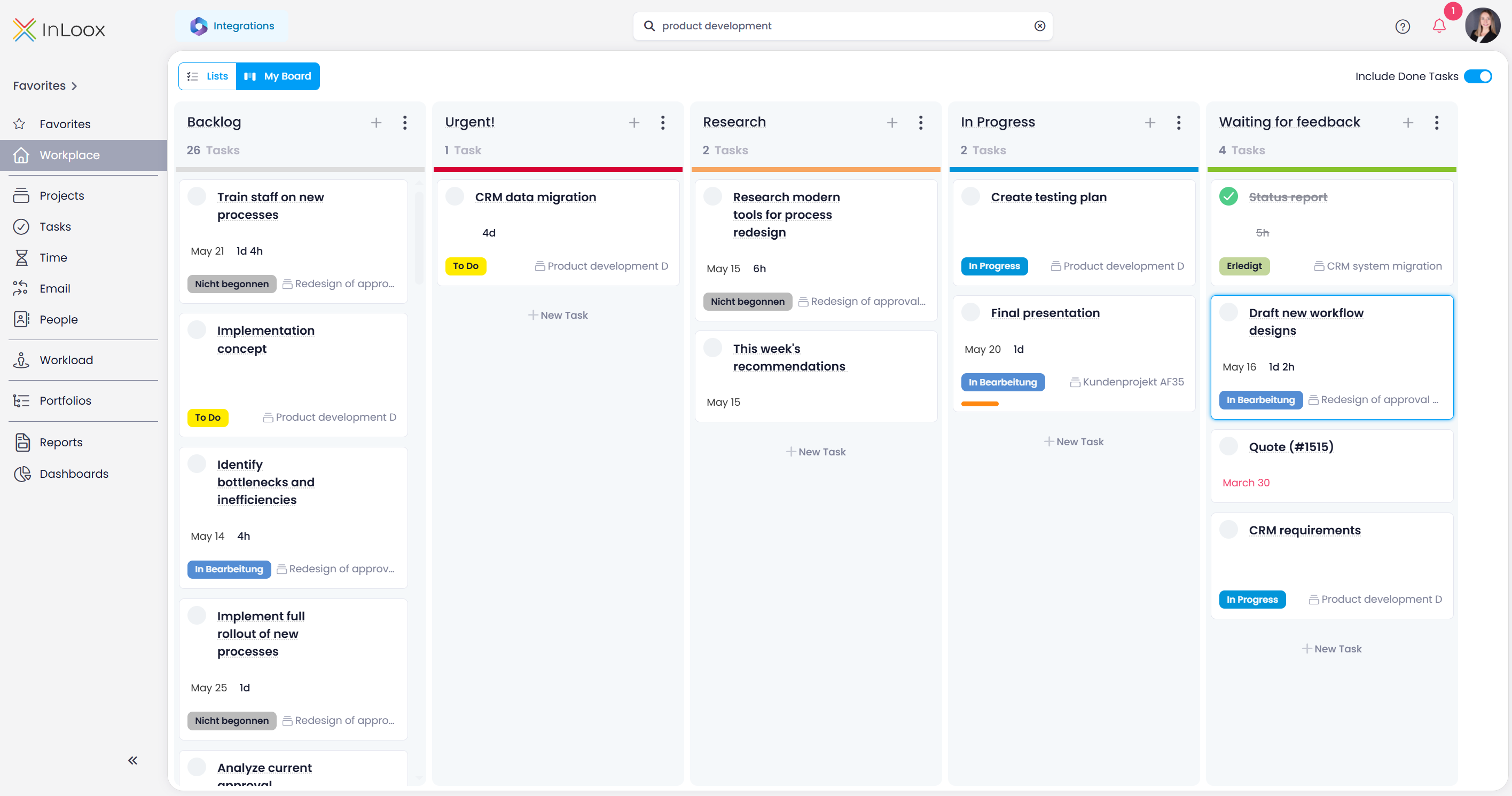
        <content type="html"><![CDATA[<p>With <strong>My Board</strong>, you organize your tasks from all projects on a personal Kanban board. It is fully customizable with your own columns tailored to your personal workflow.</p>
<p>Unlike the project Kanban board, My Board is <strong>completely personal:</strong> column names, order, and card arrangement are visible only to you. Moving a card does <strong>not</strong> change the task status in the project.</p>
<p>Switch between My Board and the classic list view at any time using the toggle in the top-left corner.</p>
<p><img decoding="async" loading="lazy" alt="My Board" src="https://docs.inloox.com/assets/images/my-board-en-fb2efee959dabcf1db8adb49b601e028.png" width="2831" height="1491" class="img_ev3q"></p>
<div class="readMore"><p>Help article: <a class="" href="https://docs.inloox.com/workplace/my-board/">My Board</a></p></div>]]></content>
        <category label="platform:web" term="platform:web"/>
        <category label="area:tasks" term="area:tasks"/>
        <category label="type:feature" term="type:feature"/>
    </entry>
    <entry>
        <title type="html"><![CDATA[The New InLoox Help Center Is Now Live]]></title>
        <id>https://docs.inloox.com/whats-new/2026/05/21/new-help-center-live/</id>
        <link href="https://docs.inloox.com/whats-new/2026/05/21/new-help-center-live/"/>
        <updated>2026-05-21T00:00:00.000Z</updated>
        <summary type="html"><![CDATA[The redesigned InLoox Help Center brings all documentation, search, and AI assistance together in one place.]]></summary>
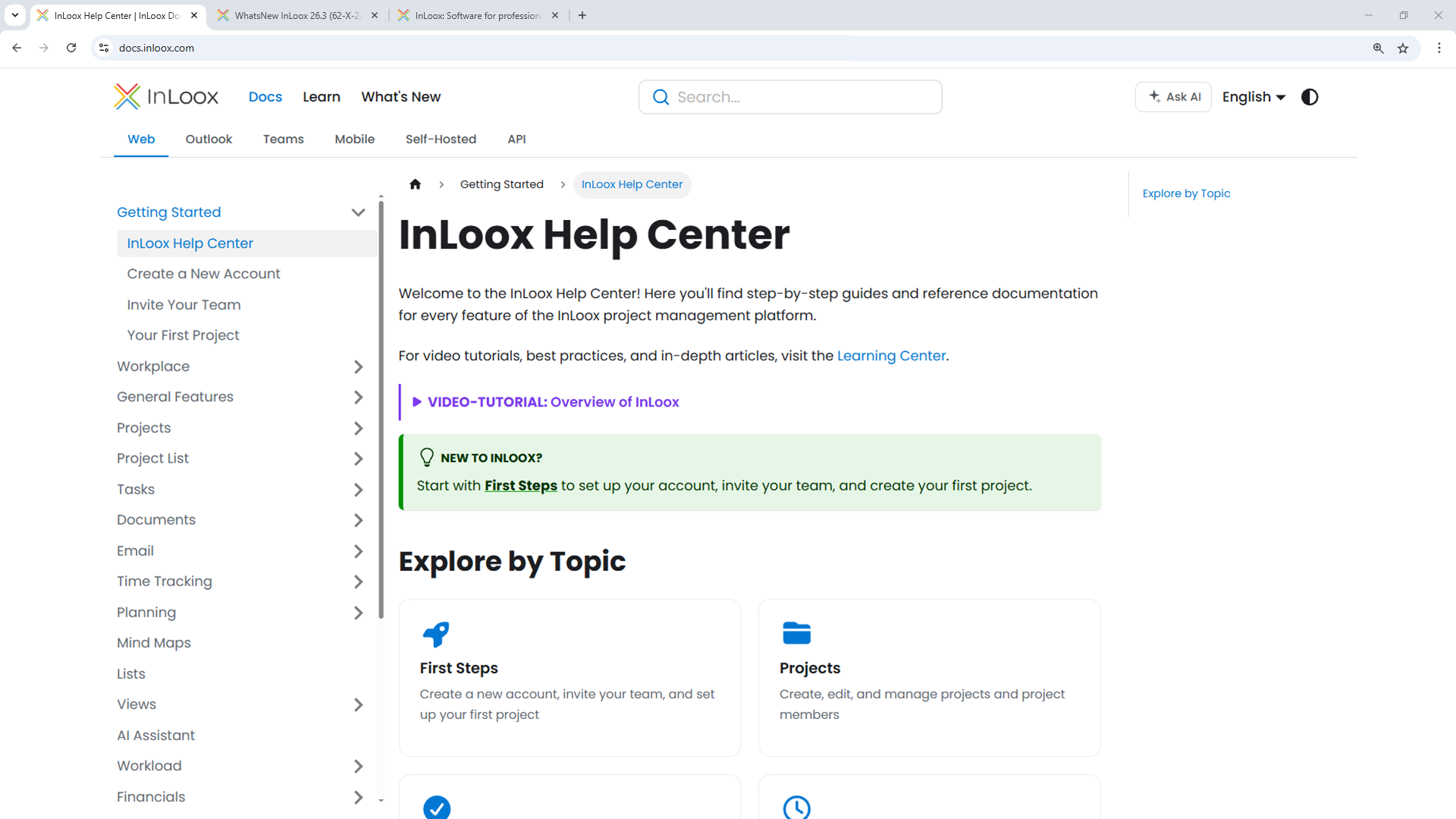
        <content type="html"><![CDATA[<p>The InLoox Help Center has been completely redesigned and is now available at <a href="https://docs.inloox.com/" target="_blank" rel="noopener noreferrer" class="">docs.inloox.com</a>. It is the central hub for all InLoox documentation, bringing together everything from InLoox Web App and InLoox for Outlook Add-in to Microsoft Teams integration, InLoox Mobile Apps, the InLoox API, and InLoox Self-Hosted installation.</p>
<p>You can access the InLoox documentation directly from InLoox Web App: simply click the question mark icon. The new Help Center offers a significantly improved user experience with clearer navigation, faster access to information, enhanced search capabilities, and integrated AI assistance.</p>
<p><img decoding="async" loading="lazy" alt="The new InLoox Help Center" src="https://docs.inloox.com/assets/images/new-inloox-docs-en-ae88ffe34a8d953dae09dfc0f4d34f64.png" width="1920" height="1080" class="img_ev3q"></p>
<h2 class="anchor anchorTargetStickyNavbar_Vzrq" id="what-youll-find">What You'll Find<a href="https://docs.inloox.com/whats-new/2026/05/21/new-help-center-live/#what-youll-find" class="hash-link" aria-label="Direct link to What You'll Find" title="Direct link to What You'll Find" translate="no">​</a></h2>
<ul>
<li class=""><strong>Comprehensive product documentation:</strong> Step-by-step guidance for all InLoox features in InLoox Web App and the Outlook and Teams Add-ins.</li>
<li class=""><strong>Getting started guides:</strong> Quick introductions to help new users set up their InLoox Account and successfully launch their first projects.</li>
<li class=""><strong>Video tutorials and learning content:</strong> A dedicated Learning Center with short video walkthroughs for the most important workflows and use cases.</li>
<li class=""><strong>InLoox API reference documentation:</strong> Detailed technical documentation for developers integrating InLoox through the OData REST API.</li>
<li class=""><strong>InLoox for Outlook and InLoox for Teams integration guides:</strong> Dedicated sections covering the InLoox Outlook Add-in and Microsoft Teams integration.</li>
<li class=""><strong>Self-Hosted installation documentation:</strong> Setup and configuration guides for on-premise deployments.</li>
</ul>
<h2 class="anchor anchorTargetStickyNavbar_Vzrq" id="faster-search-and-ai-powered-assistance">Faster Search and AI-Powered Assistance<a href="https://docs.inloox.com/whats-new/2026/05/21/new-help-center-live/#faster-search-and-ai-powered-assistance" class="hash-link" aria-label="Direct link to Faster Search and AI-Powered Assistance" title="Direct link to Faster Search and AI-Powered Assistance" translate="no">​</a></h2>
<p>The new full-text search helps you quickly find relevant articles, tutorials, and API endpoints across all documentation sections. In addition, the integrated InLoox AI Assistant can answer questions directly based on the official InLoox documentation. Simply describe your issue or ask a question to receive contextual guidance instantly.</p>
<p>The InLoox Help Center is available in English and German:</p>
<ul>
<li class=""><a href="https://docs.inloox.com/" target="_blank" rel="noopener noreferrer" class="">docs.inloox.com</a></li>
<li class=""><a href="https://docs.inloox.com/de" target="_blank" rel="noopener noreferrer" class="">docs.inloox.com/de</a></li>
</ul>]]></content>
        <category label="platform:web" term="platform:web"/>
        <category label="platform:outlook" term="platform:outlook"/>
        <category label="platform:teams" term="platform:teams"/>
        <category label="platform:mobile" term="platform:mobile"/>
    </entry>
    <entry>
        <title type="html"><![CDATA[Time: Outlook Calendar Time Tracking for Exchange Server]]></title>
        <id>https://docs.inloox.com/whats-new/2026/05/21/outlook-calendar-time-tracking/</id>
        <link href="https://docs.inloox.com/whats-new/2026/05/21/outlook-calendar-time-tracking/"/>
        <updated>2026-05-21T00:00:00.000Z</updated>
        <summary type="html"><![CDATA[Track time from Outlook calendar appointments in InLoox for Outlook, now also supported with on-premise Microsoft Exchange Server.]]></summary>
        <content type="html"><![CDATA[<p>InLoox for Outlook now supports time tracking from calendar appointments for both <strong>Microsoft Exchange Online</strong> and <strong>Microsoft Exchange Server (Self-Hosted)</strong>.</p>
<p>With Exchange Online, browse and track appointments directly from the <strong>Time</strong> tab in the add-in. With Exchange Server, open a calendar appointment in Microsoft Outlook, launch the InLoox add-in, and track the appointment from there.</p>
<div class="readMore"><p>Help article: <a class="" href="https://docs.inloox.com/outlook/time-tracking/">Time Tracking in InLoox for Outlook</a></p></div>]]></content>
        <category label="platform:outlook" term="platform:outlook"/>
        <category label="area:time-tracking" term="area:time-tracking"/>
        <category label="type:improvement" term="type:improvement"/>
    </entry>
    <entry>
        <title type="html"><![CDATA[Projects: Import Microsoft Planner Plans Directly]]></title>
        <id>https://docs.inloox.com/whats-new/2026/05/21/planner-import/</id>
        <link href="https://docs.inloox.com/whats-new/2026/05/21/planner-import/"/>
        <updated>2026-05-21T00:00:00.000Z</updated>
        <summary type="html"><![CDATA[Import plans from Microsoft Planner into InLoox to create new projects with tasks from your existing Planner boards.]]></summary>
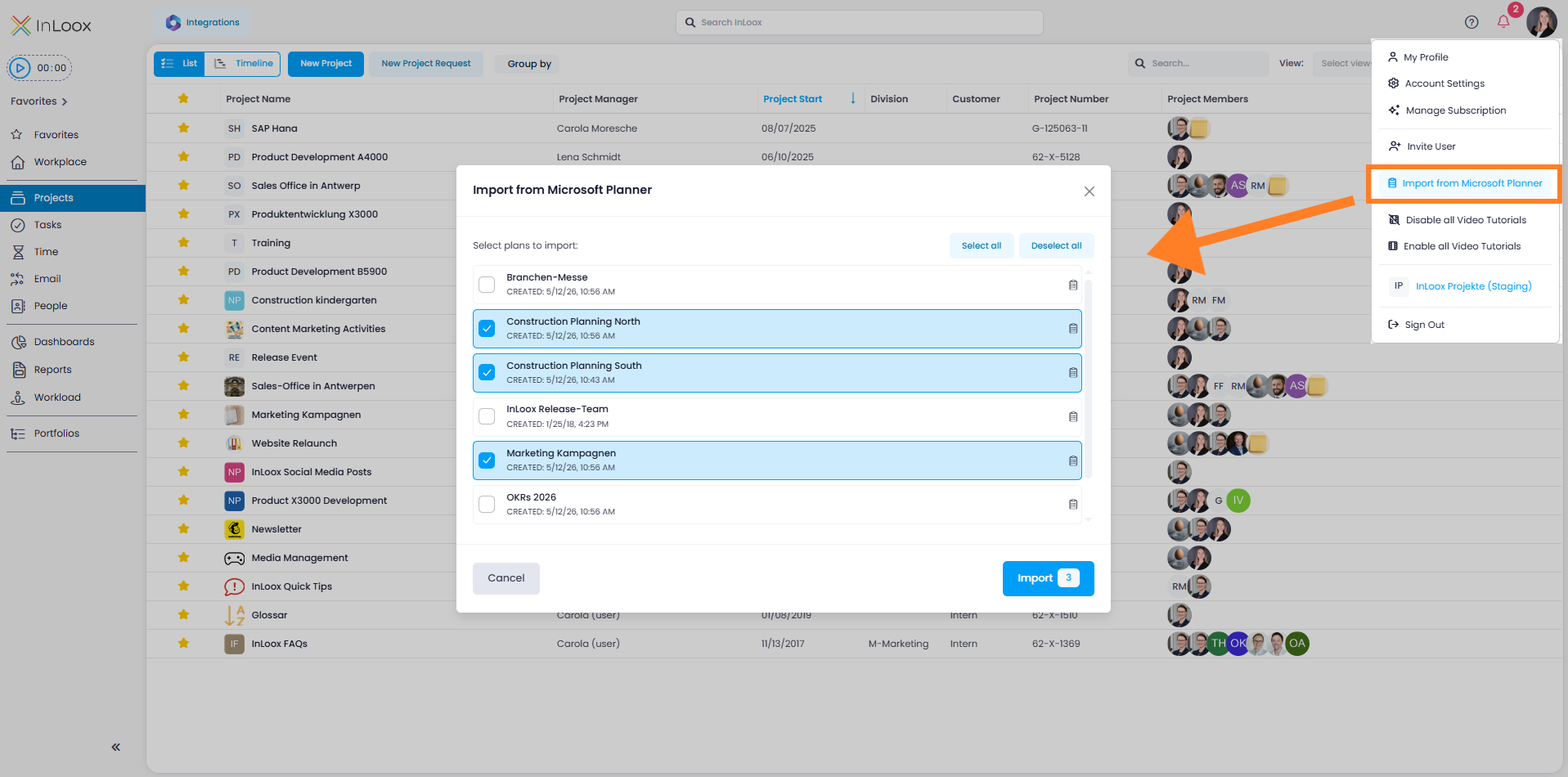
        <content type="html"><![CDATA[<p>You can now import plans from Microsoft Planner directly into InLoox. Activate the Planner Import in the Integration Center, then start the import via your profile picture with <strong>Import from Microsoft Planner</strong>.</p>
<p>InLoox creates each selected Planner plan as a new project and imports the contained tasks directly as project tasks — ideal for a quick tool switch without manual data entry.</p>
<p><img decoding="async" loading="lazy" alt="Planner import" src="https://docs.inloox.com/assets/images/planner-import-en-0c134f8e43eb8262add4a881ba3d5467.png" width="1917" height="950" class="img_ev3q"></p>
<div class="readMore"><p>Help article: <a class="" href="https://docs.inloox.com/integrations/planner-import/">Import from Microsoft Planner</a></p></div>]]></content>
        <category label="platform:web" term="platform:web"/>
        <category label="area:integrations" term="area:integrations"/>
        <category label="area:projects" term="area:projects"/>
        <category label="type:feature" term="type:feature"/>
    </entry>
    <entry>
        <title type="html"><![CDATA[People: New Read Permissions for More Control]]></title>
        <id>https://docs.inloox.com/whats-new/2026/05/21/read-permissions-people/</id>
        <link href="https://docs.inloox.com/whats-new/2026/05/21/read-permissions-people/"/>
        <updated>2026-05-21T00:00:00.000Z</updated>
        <summary type="html"><![CDATA[Control who can see and edit the People section with new global read and edit permissions.]]></summary>
        <content type="html"><![CDATA[<p>New global permissions let you control access to the <strong>People</strong> section more precisely:</p>
<ul>
<li class=""><strong>Read people</strong> — Controls whether a user can see the People section. If disabled, the section is completely hidden.</li>
<li class=""><strong>Edit people</strong> — Controls whether a user can edit contact entries. Without this permission, users can only manage their own availability.</li>
<li class=""><strong>All people available in contact picker</strong> — Controls whether a user can see all contacts when adding project members.</li>
</ul>
<p>These permissions are configured in the Account Settings under User Management. Administrator rights are required.</p>
<div class="readMore"><p>Help article: <a class="" href="https://docs.inloox.com/people-contacts/">People &amp; Contacts</a></p></div>]]></content>
        <category label="platform:web" term="platform:web"/>
        <category label="area:settings" term="area:settings"/>
        <category label="area:people" term="area:people"/>
        <category label="type:feature" term="type:feature"/>
    </entry>
    <entry>
        <title type="html"><![CDATA[Security: Require Two-Factor Authentication for All Users]]></title>
        <id>https://docs.inloox.com/whats-new/2026/05/21/require-two-factor-auth/</id>
        <link href="https://docs.inloox.com/whats-new/2026/05/21/require-two-factor-auth/"/>
        <updated>2026-05-21T00:00:00.000Z</updated>
        <summary type="html"><![CDATA[Administrators can now require all users to enable two-factor authentication (2FA) for InLoox login.]]></summary>
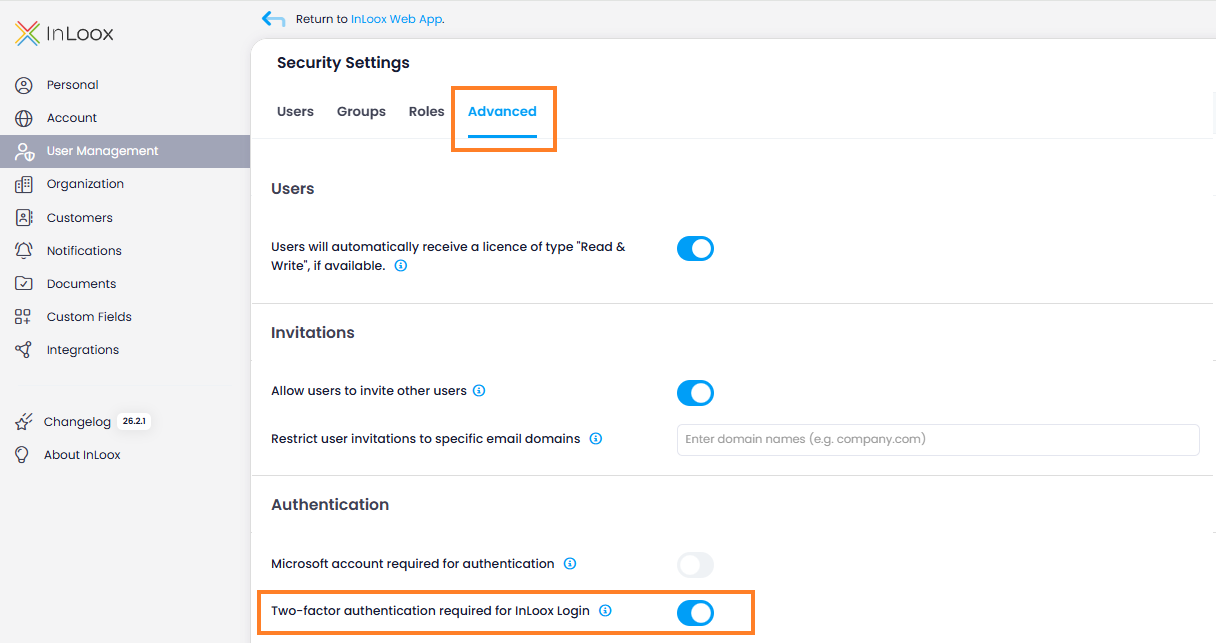
        <content type="html"><![CDATA[<p>In addition to the option of requiring login via Microsoft 365, an alternative security option is now available for organizations without Microsoft login: mandatory two-factor authentication (2FA) for the entire InLoox account.</p>
<p>Administrators can require that only users with 2FA enabled are allowed to log in to InLoox. The setting is located in the <strong>Account Settings</strong> under <strong>User Management</strong> &gt; <strong>Advanced</strong>. Activate the toggle <strong>Two-factor authentication required for InLoox Login</strong>.</p>
<p><img decoding="async" loading="lazy" alt="Two-factor authentication setting in User Management — Advanced tab" src="https://docs.inloox.com/assets/images/account-settings-user-management-advanced-tab-two-factor-authentication-en-145ff38f5761ffe794dee5917e98d1a2.png" width="1216" height="643" class="img_ev3q"></p>
<p>For two-factor authentication, users can choose between a verification code via email or an authenticator app. Users who sign in via Microsoft 365 are automatically exempt from this requirement.</p>
<p>If a user without 2FA attempts to log in, access is blocked and instructions for setting up two-factor authentication are displayed.</p>
<div class="readMore"><p>Help article: <a class="" href="https://docs.inloox.com/account-settings/require-two-factor-auth/">Require Two-Factor Authentication</a></p></div>]]></content>
        <category label="platform:web" term="platform:web"/>
        <category label="area:settings" term="area:settings"/>
        <category label="area:people" term="area:people"/>
        <category label="type:feature" term="type:feature"/>
    </entry>
    <entry>
        <title type="html"><![CDATA[Documents: SharePoint Version and Sensitivity Label]]></title>
        <id>https://docs.inloox.com/whats-new/2026/05/21/sharepoint-version-and-sensitivity/</id>
        <link href="https://docs.inloox.com/whats-new/2026/05/21/sharepoint-version-and-sensitivity/"/>
        <updated>2026-05-21T00:00:00.000Z</updated>
        <summary type="html"><![CDATA[Display SharePoint version numbers and sensitivity labels as columns in the InLoox document view.]]></summary>
        <content type="html"><![CDATA[<p>Two new columns are available in the document view for SharePoint-synchronized documents:</p>
<ul>
<li class=""><strong>SharePoint Version</strong> — Displays the document version number from SharePoint.</li>
<li class=""><strong>Sensitivity Label</strong> — Displays the sensitivity label assigned in SharePoint.</li>
</ul>
<p>Add these columns using <strong>Choose Columns</strong> in the document view. InLoox displays the data read-only — the values are managed in SharePoint.</p>
<div class="readMore"><p>Help article: <a class="" href="https://docs.inloox.com/documents/sharepoint-integration/">SharePoint Integration</a></p></div>]]></content>
        <category label="platform:web" term="platform:web"/>
        <category label="area:documents" term="area:documents"/>
        <category label="type:feature" term="type:feature"/>
    </entry>
    <entry>
        <title type="html"><![CDATA[Template Overwrite Confirmation]]></title>
        <id>https://docs.inloox.com/whats-new/2026/05/21/template-overwrite-confirmation/</id>
        <link href="https://docs.inloox.com/whats-new/2026/05/21/template-overwrite-confirmation/"/>
        <updated>2026-05-21T00:00:00.000Z</updated>
        <summary type="html"><![CDATA[A confirmation dialog now appears when saving a template with an existing name, preventing accidental overwrites.]]></summary>
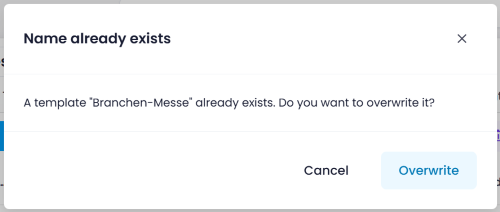
        <content type="html"><![CDATA[<p>When saving a template with a name that already exists, InLoox now shows a <strong>Name already exists</strong> confirmation dialog. You can choose to <strong>Overwrite</strong> the existing template or <strong>Cancel</strong> to keep it unchanged. This prevents accidental overwrites of existing templates.</p>
<p><img decoding="async" loading="lazy" alt="Template name already exists dialog" src="https://docs.inloox.com/assets/images/template-name-already-exists-en-9b93c837bd6766b645489aa00cd42564.png" width="500" height="212" class="img_ev3q"></p>
<div class="readMore"><p>Help articles: <a class="" href="https://docs.inloox.com/tasks/project-tasks/task-templates/">Task Templates</a> · <a class="" href="https://docs.inloox.com/project-planning/save-load-import-and-export-planning-templates/">Planning Templates</a></p></div>]]></content>
        <category label="platform:web" term="platform:web"/>
        <category label="area:tasks" term="area:tasks"/>
        <category label="area:planning" term="area:planning"/>
        <category label="type:improvement" term="type:improvement"/>
    </entry>
    <entry>
        <title type="html"><![CDATA[Set Category on Processed Emails]]></title>
        <id>https://docs.inloox.com/whats-new/2026/04/01/category-on-processed-emails/</id>
        <link href="https://docs.inloox.com/whats-new/2026/04/01/category-on-processed-emails/"/>
        <updated>2026-04-01T00:00:00.000Z</updated>
        <summary type="html"><![CDATA[Automatically assign the InLoox category to emails when a task is created from them.]]></summary>
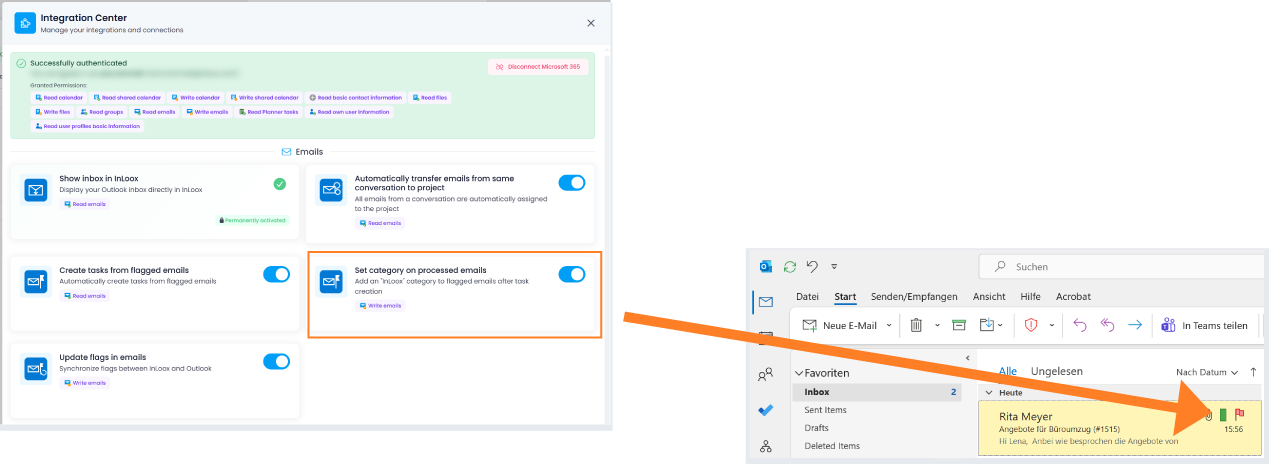
        <content type="html"><![CDATA[<p>In the email integration, you can now automatically assign the category "InLoox" to emails that have been processed — such as when a task is created from an email (e.g., via flagging). This allows you to easily identify which emails have already been turned into tasks in InLoox directly within your inbox.</p>
<p>Prerequisite: The toggle <strong>Set category on processed emails</strong> must be enabled in the Integration Center.</p>
<p><img decoding="async" loading="lazy" alt="InLoox category on flagged mails" src="https://docs.inloox.com/assets/images/inloox-category-on-flagged-mails-en-8e7a34b41143cfee5d5adac96d771178.png" title="Category on processed emails" width="1269" height="464" class="img_ev3q"></p>
<div class="readMore"><p>Help article: <a class="" href="https://docs.inloox.com/integrations/emails/#set-category-on-processed-emails">Integrations: Emails</a></p></div>]]></content>
        <category label="platform:web" term="platform:web"/>
        <category label="platform:outlook" term="platform:outlook"/>
        <category label="area:integrations" term="area:integrations"/>
        <category label="type:feature" term="type:feature"/>
    </entry>
    <entry>
        <title type="html"><![CDATA[Display of Completed Tasks in Workload]]></title>
        <id>https://docs.inloox.com/whats-new/2026/04/01/completed-tasks-in-workload/</id>
        <link href="https://docs.inloox.com/whats-new/2026/04/01/completed-tasks-in-workload/"/>
        <updated>2026-04-01T00:00:00.000Z</updated>
        <summary type="html"><![CDATA[Include completed tasks in workload calculations to enable retrospective analysis of team capacity.]]></summary>
        <content type="html"><![CDATA[<p>The workload view now allows you to include completed tasks in the calculation. Using the new <strong>Done Tasks</strong> toggle, you can define whether finished tasks should be considered in workload calculations. This makes it possible to analyze workload retrospectively — for example, to review how team capacity was distributed over the past week.</p>
<p><img decoding="async" loading="lazy" alt="Completed tasks in workload view" src="https://docs.inloox.com/assets/images/done-tasks-in-workload-en-cecb4dc60ff82120af6a2c1133850656.png" title="Display of completed tasks in workload" width="1510" height="86" class="img_ev3q"></p>
<div class="readMore"><p>Help article: <a class="" href="https://docs.inloox.com/workload/">Workload</a></p></div>]]></content>
        <category label="platform:web" term="platform:web"/>
        <category label="area:workload" term="area:workload"/>
        <category label="type:improvement" term="type:improvement"/>
    </entry>
    <entry>
        <title type="html"><![CDATA[Conditional Formatting: Custom Colors]]></title>
        <id>https://docs.inloox.com/whats-new/2026/04/01/conditional-formatting-custom-colors/</id>
        <link href="https://docs.inloox.com/whats-new/2026/04/01/conditional-formatting-custom-colors/"/>
        <updated>2026-04-01T00:00:00.000Z</updated>
        <summary type="html"><![CDATA[Use custom colors in conditional formatting with a full color picker for precise brand-compliant color values.]]></summary>
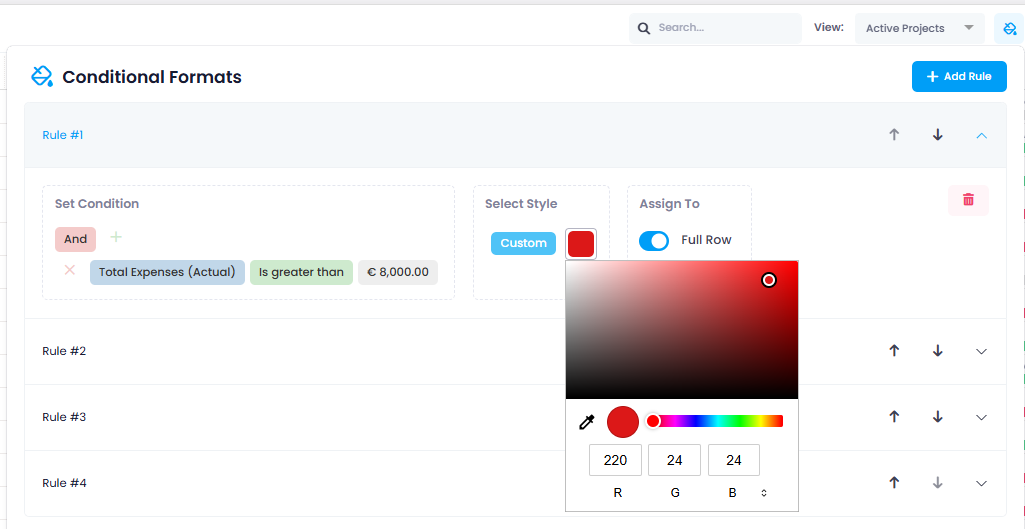
        <content type="html"><![CDATA[<p>Custom colors are now available in conditional formatting. In addition to the predefined color options, you can now select "Custom" which opens a full color picker. There, you can define colors using <strong>RGB, Hex, or HSL</strong> values, or simply choose your desired shade using the <strong>integrated color picker</strong>.</p>
<p>This allows you, for example, to apply precise brand-compliant colors (CI colors) — for maximum flexibility in visually designing your project and task lists.</p>
<p><img decoding="async" loading="lazy" alt="Custom colors in conditional formats" src="https://docs.inloox.com/assets/images/custom-colors-in-conditional-formats-en-e33f3f80b32c33e3fd6a6d5e9bc67020.png" title="Custom colors in conditional formatting" width="1025" height="529" class="img_ev3q"></p>
<div class="readMore"><p>Help article: <a class="" href="https://docs.inloox.com/list-views/conditional-formats/">Conditional Formats</a></p></div>]]></content>
        <category label="platform:web" term="platform:web"/>
        <category label="area:views" term="area:views"/>
        <category label="area:projects" term="area:projects"/>
        <category label="type:improvement" term="type:improvement"/>
    </entry>
    <entry>
        <title type="html"><![CDATA[Conditional Formatting: Advanced Date Comparisons]]></title>
        <id>https://docs.inloox.com/whats-new/2026/04/01/conditional-formatting-date-comparisons/</id>
        <link href="https://docs.inloox.com/whats-new/2026/04/01/conditional-formatting-date-comparisons/"/>
        <updated>2026-04-01T00:00:00.000Z</updated>
        <summary type="html"><![CDATA[New date comparison operators in conditional formatting allow highlighting based on relative date ranges.]]></summary>
        <content type="html"><![CDATA[<p>Conditional formatting has been enhanced with more flexible date comparisons. New comparison operators such as "Is earlier than N days from today" and "Is later than N days from today" are now available.</p>
<p>This allows you, for example, to highlight tasks whose due date falls within the next 14 calendar days, or to mark projects whose start date is more than 30 days in the past. It also enables you to visually represent sprint periods or upcoming deadlines.</p>
<div class="theme-admonition theme-admonition-note admonition_xJq3 alert alert--secondary"><div class="admonitionHeading_Gvgb"><span class="admonitionIcon_Rf37"><svg viewBox="0 0 14 16"><path fill-rule="evenodd" d="M6.3 5.69a.942.942 0 0 1-.28-.7c0-.28.09-.52.28-.7.19-.18.42-.28.7-.28.28 0 .52.09.7.28.18.19.28.42.28.7 0 .28-.09.52-.28.7a1 1 0 0 1-.7.3c-.28 0-.52-.11-.7-.3zM8 7.99c-.02-.25-.11-.48-.31-.69-.2-.19-.42-.3-.69-.31H6c-.27.02-.48.13-.69.31-.2.2-.3.44-.31.69h1v3c.02.27.11.5.31.69.2.2.42.31.69.31h1c.27 0 .48-.11.69-.31.2-.19.3-.42.31-.69H8V7.98v.01zM7 2.3c-3.14 0-5.7 2.54-5.7 5.68 0 3.14 2.56 5.7 5.7 5.7s5.7-2.55 5.7-5.7c0-3.15-2.56-5.69-5.7-5.69v.01zM7 .98c3.86 0 7 3.14 7 7s-3.14 7-7 7-7-3.12-7-7 3.14-7 7-7z"></path></svg></span>note</div><div class="admonitionContent_BuS1"><p>Values are specified in calendar days. All comparisons are based on the current date ("today") and automatically shift as time progresses.</p></div></div>
<p><img decoding="async" loading="lazy" alt="Advanced date comparisons in conditional formats" src="https://docs.inloox.com/assets/images/advanced-date%20comparisons-in-conditional-formats-en-6ed6b13674dd39d6f37a1d3db8c9441c.png" title="Advanced date comparisons in conditional formatting" width="253" height="600" class="img_ev3q"></p>
<div class="readMore"><p>Help article: <a class="" href="https://docs.inloox.com/list-views/conditional-formats/">Conditional Formats</a></p></div>]]></content>
        <category label="platform:web" term="platform:web"/>
        <category label="area:views" term="area:views"/>
        <category label="area:projects" term="area:projects"/>
        <category label="type:feature" term="type:feature"/>
    </entry>
</feed>