Planning: Default Calendar for New Activities
Not every project runs on a Monday-to-Friday schedule. You can now choose the default calendar for a project, and InLoox uses it for every newly created planning element. You no longer have to switch the calendar on each new activity by hand.
-
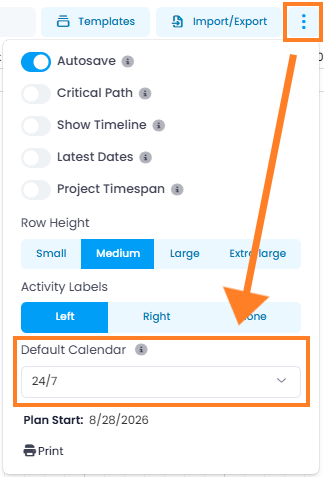
Project default calendar: New projects start with the Standard calendar. Choose another calendar, for example 24/7 for continuous operation or a calendar of your own, and all new activities in the project use it.
-
Where to set it: In the project's Planning, click in the top-right corner and select the calendar under Default Calendar.
-
Individual exceptions: You can still select a different calendar for a single activity in the side panel.
Select the default calendar before you create the first planning elements. A later change only applies to planning elements created afterwards. Existing activities and milestones keep their calendar. Planning elements from a planning template also keep the calendar stored in the template.
Help article: Planning Layout: Default Calendar