New Project Performance Indicators
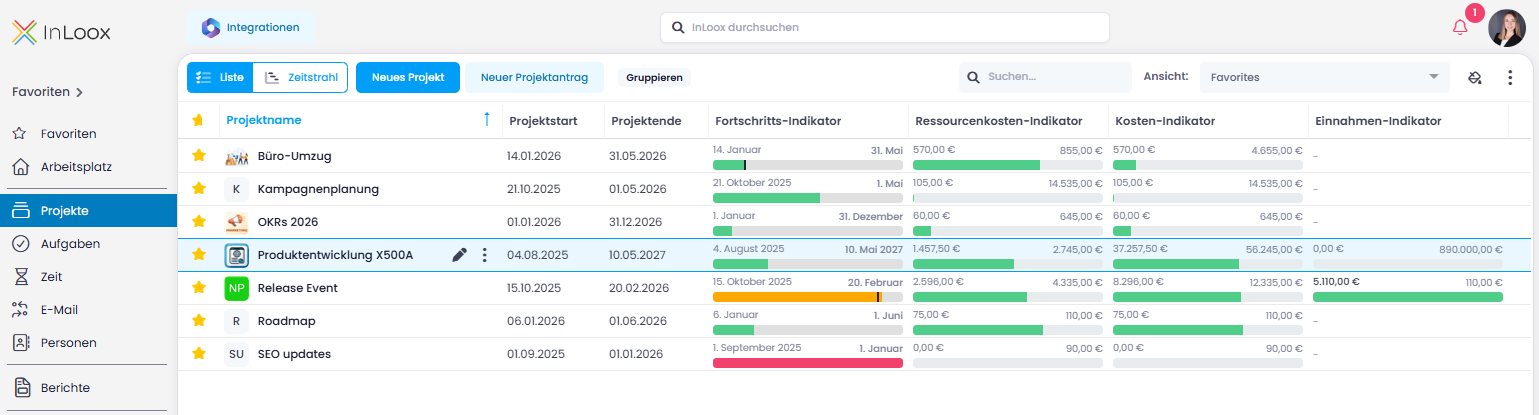
The project list now includes four new columns with visual indicators. These provide an instant overview of your projects' timeline, costs, and revenue — without the need for additional reports or dashboards:
- Progress Performance: Visualizes the project timeline between start and end dates. A traffic light system (red, orange, green) shows whether the project is on schedule, while a marker indicates the actual work progress. This makes delays immediately visible.
- Revenue Performance: Compares planned and actual revenue. Once the revenue target is reached or exceeded, the bar turns green.
- Cost Performance: Compares planned and actual total expenses, making budget deviations instantly visible.
- Resource Cost Performance: Based on time tracking data, this shows whether planned resource costs are being met or exceeded.
Help article: Project List - Performance Indicator Columns