Create Tasks from Emails Using Outlook Flags
InLoox users are already familiar with creating tasks directly from emails — for example via the InLoox for Outlook side panel, where tasks can be generated from an email with just one click.
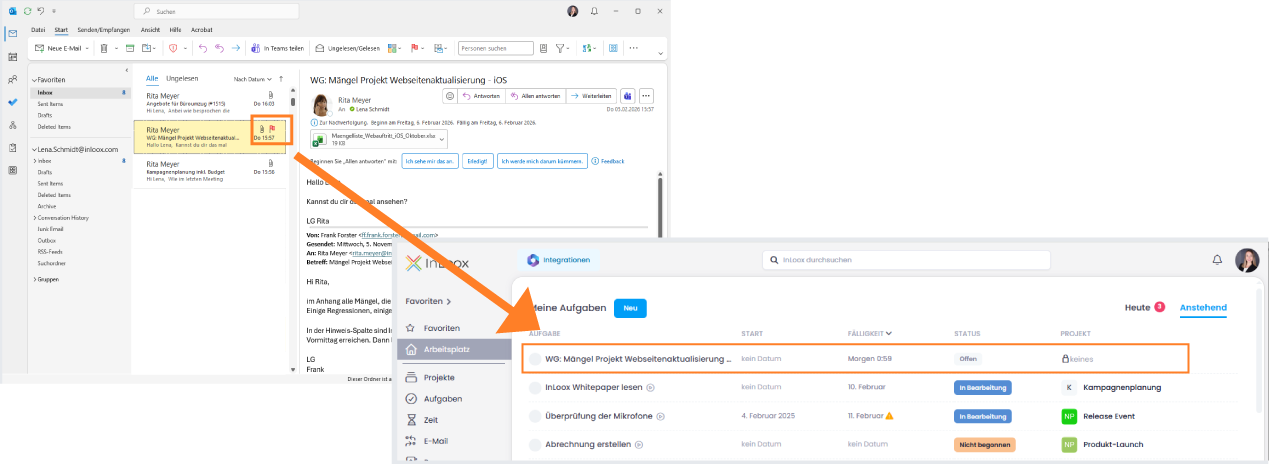
New in InLoox 26.1 is an additional, convenient option: after activating the feature Create tasks from flagged emails in the Integration Center, emails flagged in Outlook (e.g., Today, Tomorrow, Next Week) automatically generate corresponding InLoox tasks.
Optionally, synchronization can also be enabled here: if Update flags in emails is activated, completing the task in InLoox will automatically update Outlook and mark the email flag as completed as well. This new flag-based logic complements the existing side panel and provides another flexible way to quickly turn emails into structured tasks.
Help articles: Integrations: Emails | Create Tasks