Project Dashboards: All Key Metrics at a Glance
With the new Project Dashboards, you always keep track of each individual project – quickly, transparently, and without detours. In the new "Dashboard" tab, you will find a standard dashboard that presents the most important project metrics:
- Tasks by status and assignee: Who is working on what, and what's the progress
- Burndown chart: How open tasks evolve over time
- Planned vs. actual costs and revenues: Financial transparency at a glance
- Risk matrix: Impact and likelihood of potential risks always visible
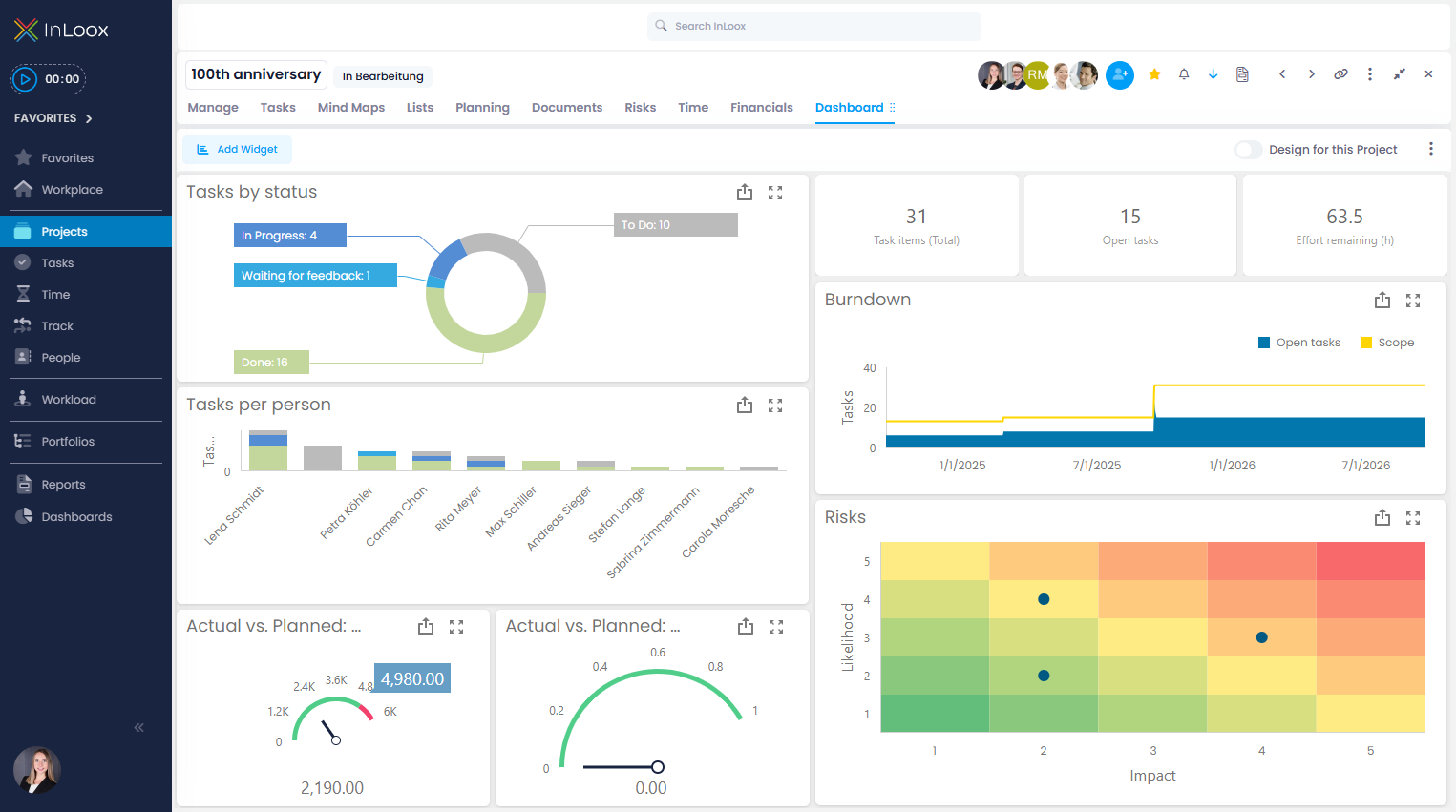
You can decide whether to customize the dashboard individually per project, or define a customized version as the organization-wide standard. This way, teams benefit equally from consistent reporting and individual insights.
Dashboards are only available in the editions InLoox Enterprise, Enterprise Plus, and On-Prem.
New permissions for dashboards
Alongside the new features, permissions have been expanded to give you more control. You can now precisely define who may only view dashboards and who may actively edit them. The following rights are available:
- Read project dashboard
- Edit project dashboard
- Read dashboards
- Edit dashboards
Help articles: Dashboards | Permissions