Hardware Sizing & Network Architecture
This page provides hardware recommendations for InLoox Self-Hosted deployments, including server specifications for different user scenarios and network architecture guidelines.
System Components and Flow of Data
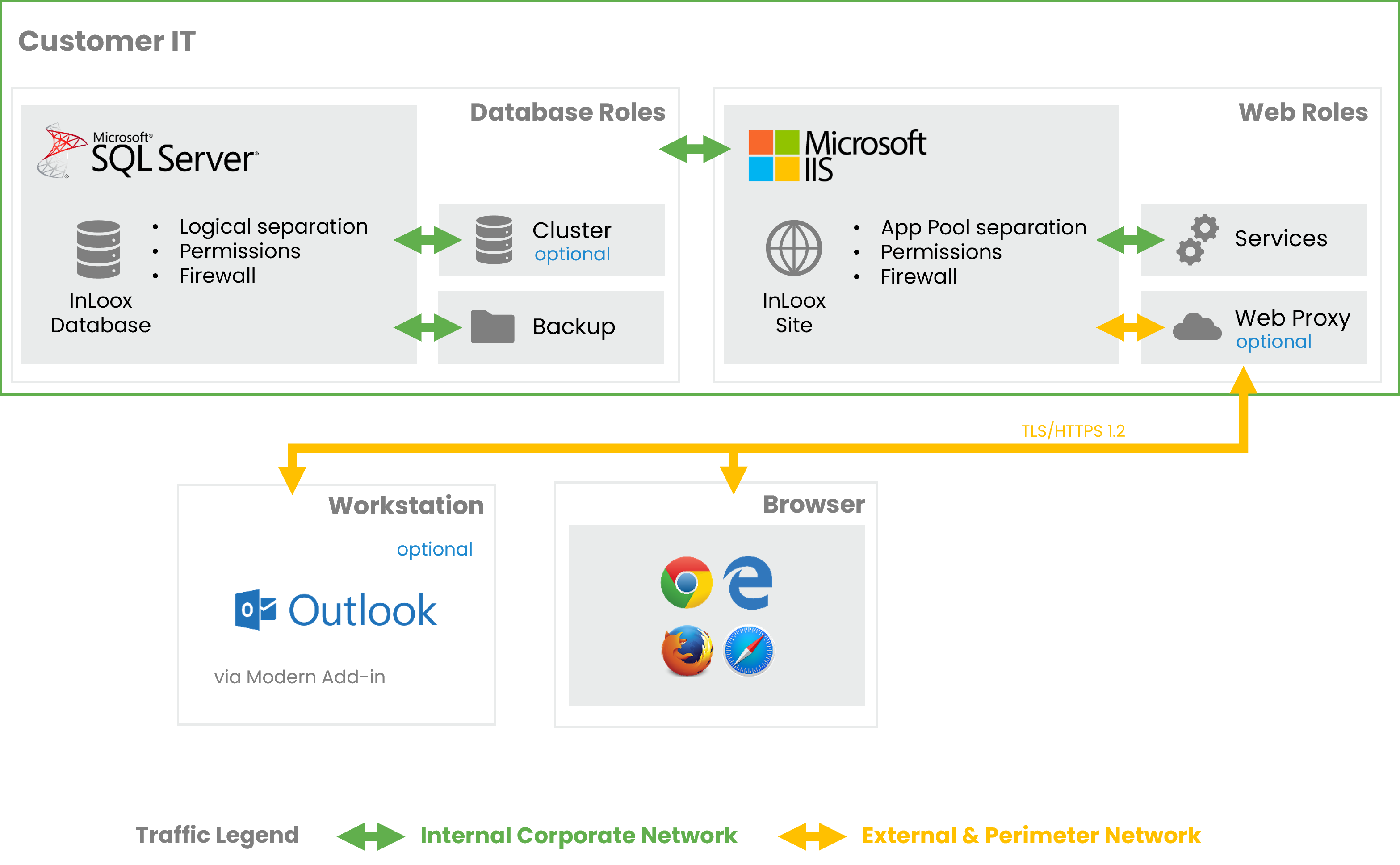
The following diagram shows the InLoox Self-Hosted architecture, divided into the internal corporate network and the external/perimeter network.
- InLoox Site — Hosted on IIS with web roles including App Pool separation, permissions management, and firewall rules. Includes optional services and web proxy.
- InLoox Database — Microsoft SQL Server with database roles providing logical separation, permissions management, and firewall rules. Backup is managed by customer IT.
- Workstation — Users access InLoox via a supported browser over TLS/HTTPS 1.2.
- Modern Add-in — Microsoft Outlook connects to InLoox via the Modern Add-in.
- Cluster (optional) — Web and database servers can be clustered for high availability.
All traffic between clients and the InLoox Site is encrypted with TLS/HTTPS 1.2.
Network Architecture
Required Components
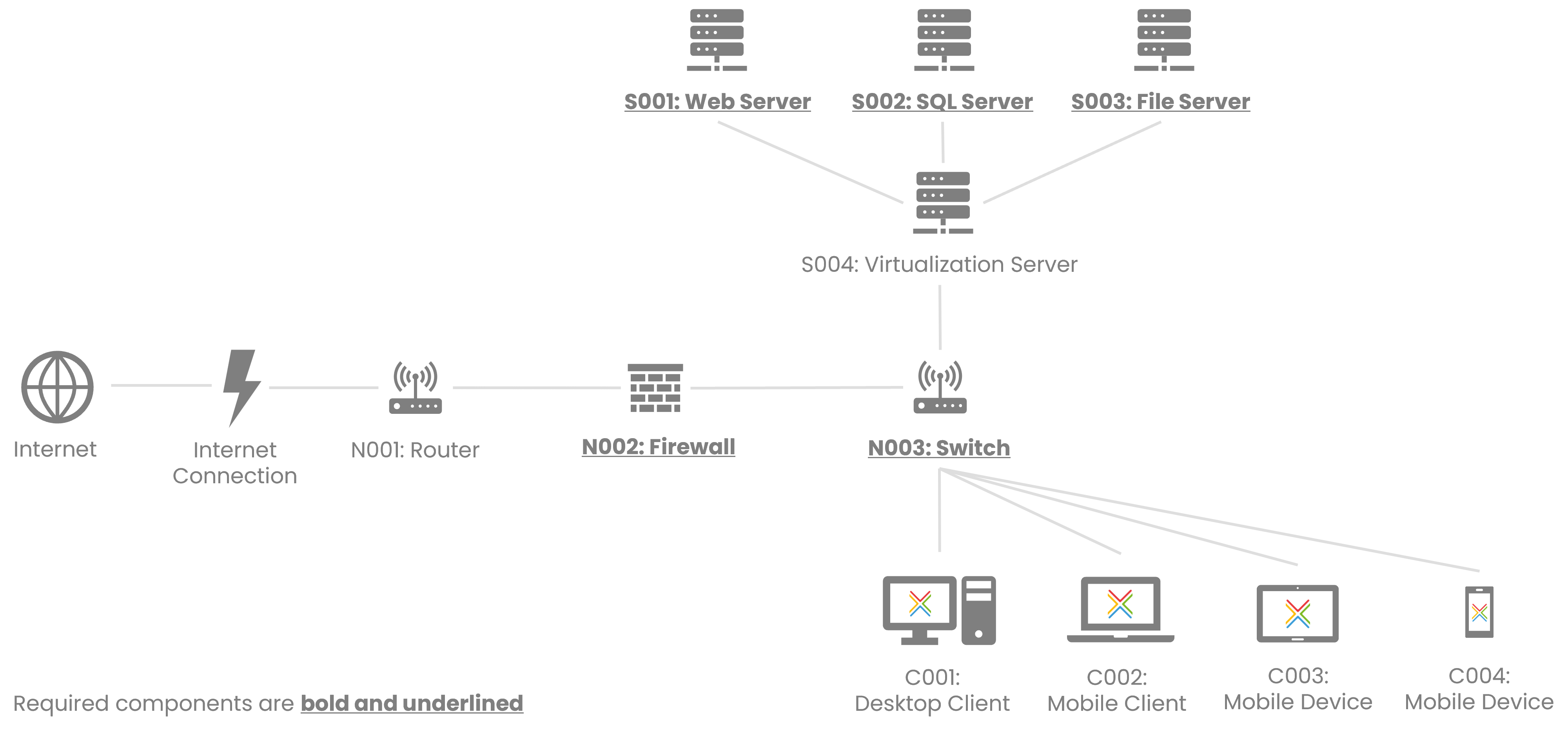
- Web Server (S001) — Hosts the InLoox web application on Microsoft IIS
- SQL Server (S002) — Hosts the InLoox database on Microsoft SQL Server
- Router (N001) — Network routing
- Firewall (N002) — Network security
- Switch (N003) — Network connectivity
- Desktop Client (C001) — Browser-based access to InLoox Web App
- Mobile Client (C002) — Browser-based mobile access
Optional Components
- File Server (S003) — Dedicated file storage for project documents
- Virtualization Server (S004) — Hosts Web Server and/or SQL Server as virtual machines
- Mobile Device (C003, C004) — InLoox Mobile App access
Web Server and SQL Server can run on the same physical or virtual machine for smaller deployments. For larger deployments, dedicated servers are recommended.
Server Hardware Recommendations
Database Growth
The InLoox database grows approximately 5 to 20 MB per user per year. This does not include file storage for project documents.
Scenario 1 - Up to 100 Users
Annual database growth: approximately 0.5 to 2 GB per year.
Database Server (Microsoft SQL Server)
| Component | Recommended |
|---|---|
| Processor | Quad-core x64 architecture, 2 GHz CPU or higher (e.g. AMD Opteron or Intel Xeon) |
| Memory | 8 GB RAM or more |
| Hard disk | SAS RAID 5 or RAID 10 hard disk array |
Web Server (Microsoft IIS)
| Component | Recommended |
|---|---|
| Processor | Quad-core x64 architecture, 2 GHz CPU or higher (e.g. AMD Opteron or Intel Xeon) |
| Memory | 8 GB RAM or more |
| Hard disk | SAS RAID 5 or RAID 10 hard disk array. RAID is not required when using redundant servers. |
Scenario 2 - Up to 200 Users
Annual database growth: approximately 1 to 4 GB per year.
Database Server (Microsoft SQL Server)
| Component | Recommended |
|---|---|
| Processor | Quad-core x64 architecture, 2 GHz CPU or higher (e.g. AMD Opteron or Intel Xeon) |
| Memory | 16 GB RAM or more |
| Hard disk | SAS RAID 5 or RAID 10 hard disk array |
Web Server (Microsoft IIS)
| Component | Recommended |
|---|---|
| Processor | Quad-core x64 architecture, 2 GHz CPU or higher (e.g. AMD Opteron or Intel Xeon) |
| Memory | 8 GB RAM or more |
| Hard disk | SAS RAID 5 or RAID 10 hard disk array. RAID is not required when using redundant servers. |
Scenario 3 - Up to 500 Users
Annual database growth: approximately 2.5 to 10 GB per year.
Database Server (Microsoft SQL Server)
| Component | Recommended |
|---|---|
| Processor | 8-core x64 architecture, 2.5 GHz CPU or higher (e.g. Intel Xeon Scalable) |
| Memory | 32 GB RAM or more |
| Hard disk | SSD RAID 5 or RAID 10 array |
Web Server (Microsoft IIS)
| Component | Recommended |
|---|---|
| Processor | 8-core x64 architecture, 2.5 GHz CPU or higher (e.g. Intel Xeon Scalable) |
| Memory | 16 GB RAM or more |
| Hard disk | SSD RAID 5 or RAID 10 array. RAID is not required when using redundant servers. |
For 500 users or more, we recommend running the database server and web server on separate machines.
Scenario 4 - Up to 1,000 Users
Annual database growth: approximately 5 to 20 GB per year.
Database Server (Microsoft SQL Server)
| Component | Recommended |
|---|---|
| Processor | 16-core x64 architecture, 2.5 GHz CPU or higher (e.g. Intel Xeon Scalable) |
| Memory | 64 GB RAM or more |
| Hard disk | SSD RAID 10 array |
Web Server (Microsoft IIS)
| Component | Recommended |
|---|---|
| Processor | 8-core x64 architecture, 2.5 GHz CPU or higher (e.g. Intel Xeon Scalable) |
| Memory | 32 GB RAM or more |
| Hard disk | SSD RAID 10 array. Consider load balancing across multiple web servers. |
Scenario 5 - Up to 10,000 Users
Annual database growth: approximately 50 to 200 GB per year.
Database Server (Microsoft SQL Server)
| Component | Recommended |
|---|---|
| Processor | 32-core x64 architecture, 2.5 GHz CPU or higher (e.g. Intel Xeon Scalable) |
| Memory | 128 GB RAM or more |
| Hard disk | NVMe SSD RAID 10 array |
Web Server (Microsoft IIS)
| Component | Recommended |
|---|---|
| Processor | 16-core x64 architecture, 2.5 GHz CPU or higher (e.g. Intel Xeon Scalable) |
| Memory | 64 GB RAM or more |
| Hard disk | SSD RAID 10 array |
For deployments of this size, we strongly recommend load balancing across multiple web servers and using SQL Server Always On Availability Groups for high availability. Please contact InLoox Support for a tailored sizing recommendation.
External Access
To provide access to InLoox from outside your corporate network, the following architecture is recommended:
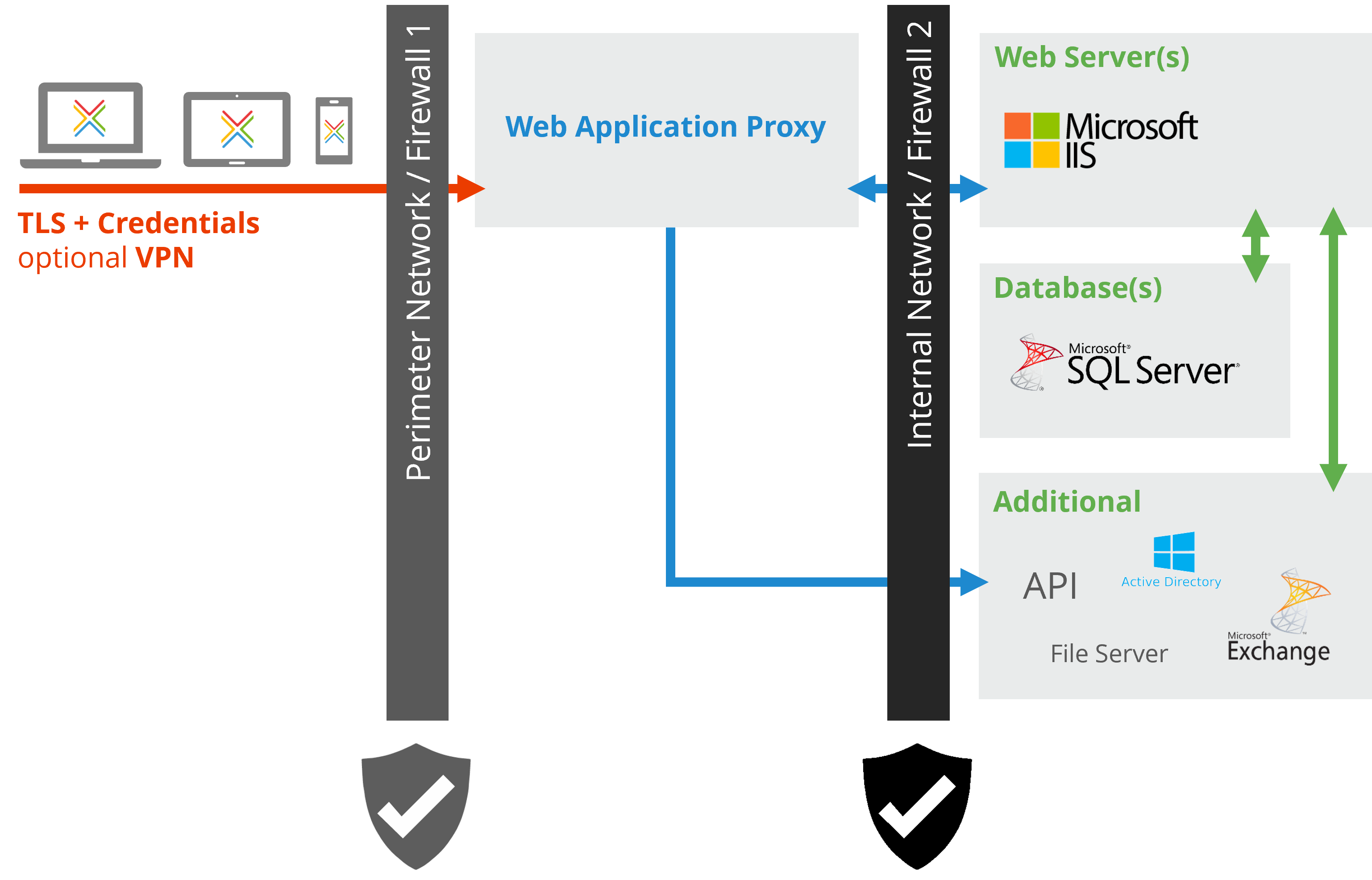
- Set up a Web Application Proxy in the perimeter network (DMZ) behind Firewall 1.
- Configure TLS encryption and credential-based authentication on the proxy.
- Place the Web Server(s), Database(s), File Server, and API in the internal network behind Firewall 2.
- Optionally, configure VPN access as an alternative to the Web Application Proxy.
For detailed software requirements, see System Requirements.