InLoox LogoInLoox Logo
DocsLearn
English
  • English
  • Deutsch
WebOutlookTeamsMobileSelf-HostedAPI
  • Getting Started
  • Workplace
  • General Features
  • Projects
  • Project List
  • Tasks
  • Documents
  • Email
  • Time Tracking
  • Planning
  • Mind Maps
  • Lists
  • Views
  • AI Assistant
  • Workload
  • Financials
  • Reports & Dashboards
    • Reports
    • Report Designer
      • First Look at the Report Designer
      • Add New Reports
      • Open Reports
      • Save Reports
      • Introduction to Banded Reports
      • Bind to Data
      • Create Reports
      • Configure Design Settings
      • Use Report Elements
      • Use Report Parameters
      • Shape Report Data
      • Lay out Dynamic Report Content
      • Customize Appearance
      • Add Navigation
      • Provide Interactivity
      • Add Extra Information
      • Merge Reports
        • Add a Report to the End/Beginning
        • Use Data-Driven Page Sequence
      • Use Expressions
      • Localize Reports
      • Preview, Print and Export Reports
      • Report Designer Tools
    • Dashboards
    • Dashboard Designer
  • Risks
  • Portfolio
  • People & Contacts
  • Integrations
  • Personal Settings
  • Admin Settings
  • Help & Support
  • Reports & Dashboards
  • Report Designer
  • Merge Reports

Merge Reports

You may have report pages that do not fit within an entire report template in the following cases:

  • Title pages or custom pages at the end of the report;
  • Charts within a table report;

You can create pages in a separate report and merge them into your base report. This enables you to print and export merged pages as a single document, and preserve the original report page settings and orientation.
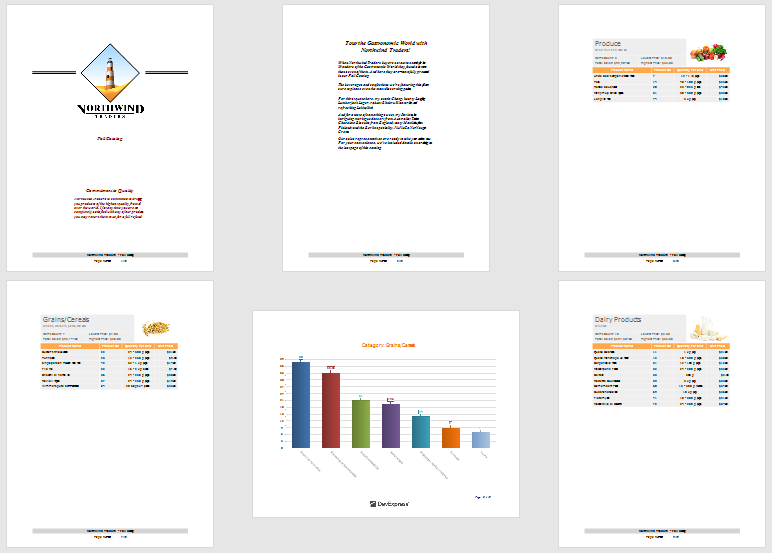
report-merging

Previous
Display the User Name in a Report
Next
Add a Report to the End/Beginning
Copyright © 2001-2026 InLoox GmbH. All rights reserved.
Ask AI

Ask a question about InLoox documentation.

AI answers may contain errors.