Overview: Columns in Views
In the following overview, you will find all columns from the views in these sections:
- Projects
- Tasks
- Gantt Plan
- Time Entries
- Documents
- Project Risks
- Project Financials
- People
- Portfolios
- Workload
In the InLoox Account Settings, you will find columns for:
- Organization › Skills
- Organization › Days off
- Organization › Availability
- Organization › Cost/Benefit Plan Templates
- The columns listed here are the defaults. If you create custom fields, they also become available in the column selection for the respective view.
- The Column name corresponds to the display name in InLoox. The Data set specifies the technical name you need when visualizing values in dashboards or reports.
- This list is continuously updated as new features and improvements are released.
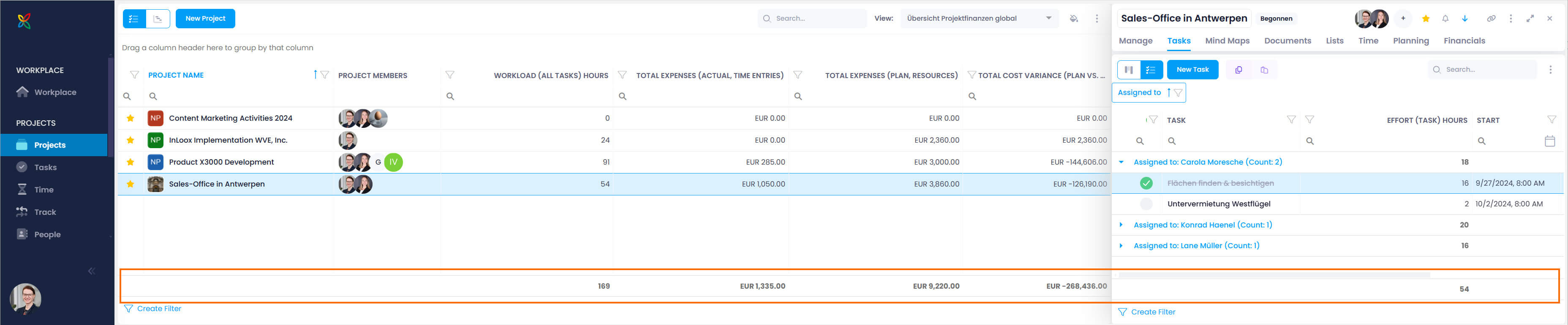
- Since InLoox version 11.14, lists display the sum total for numeric fields at the bottom. For example, showing the Effort (task) hours column will display the total of all values in that column.
Columns in the Projects List
For further details, see the help articles on the InLoox Projects List.
In addition, the project list offers trend columns that show the daily history of a value as a sparkline — see Trend columns at the end of this section.
| Column Name | Data Set | Notes |
|---|---|---|
| % Complete (Project - Actual) | Project_CompleteActual | (Total effort in completed tasks) / (Total effort in tasks) in percent |
| % Complete (Project - Plan) | Project_CompletePlan | Based on tasks under planning elements with End < Now |
| % Complete (Project - Status) | Project_CompleteStatus | Value defined for the current project status. Identical to "Project Status in %" |
| All Time Entries Billed | Project_AllPositionsBilled | Check mark (✓) when all billable time entries are billed; non-billable entries are ignored |
| Archived | Project_IsArchived | Check mark (✓) if archived |
| Backwards Scheduling | Project_BackwardScheduling | |
| Booked Hours (Project) | Project_TimeEntriesDuration | |
| Complete (Project - Plan vs Actual) | Project_CompletePlanActual | = (% Complete Actual) − (% Complete Plan) |
| Contacts (Customer) | Project_CustomerProjectContact | |
| Contacts (Manager) | Project_ManagerProjectContact | |
| Contacts (More) | Project_MoreProjectContact | |
| Contacts (Partner) | Project_PartnerProjectContact | |
| Contacts (Team) | Project_TeamProjectContact | |
| Cost Performance | — | Traffic light indicator for actual vs. planned costs. Green = below planned; orange = 0.01–5% over; red = more than 5.01% over |
| Count Project Notes | Project_NotesCount | Displays a number |
| Count Task Items | Project_TasksCount | Displays a number |
| Customer | Project_ClientName | |
| Customer Number | Project_ClientNumber | |
| Customer Number and Name | Project_ClientNumberName | |
| Division | Project_DivisionName | |
| Document Folder | Project_DocumentFolder | |
| Document Library | Project_FSDocumentLibrary | |
| Document Store Type | Project_StoreType | |
| Project Email Address | Project_EmailAddress | |
| Done | Project_Complete | |
| Favorite (Star Icon) | Project_IsFavorite | |
| Financial Warning (Icon) | Project_BudgetIndicator | Budget icon instead of column name |
| First Additional Contact | Project_FirstAdditionalContact | |
| First Customer | Project_FirstCustomer | First name from "Customer" field |
| First Incomplete Activity | Project_FirstNotCompletedPlanningDate | |
| First Partner | Project_FirstPartner | |
| First Team Member | Project_FirstTeamMember | |
| Fixed Deadline | Project_IsEndDateFixed | |
| Image | Project_Image | Project image only, without the name |
| Last Project Change by | Project_LastChangedByName | Person who made the most recent project change, including follower and task status changes |
| Last Project Change on | Project_LastChangedDateTime | Date and time of the most recent project change, including follower and task status changes |
| Last Project Note | Project_Note | |
| Locked (Icon) | Project_Locked | Shows when a project is locked and cannot be edited |
| Overall Score | Project_CalculatedScore | Score of the project evaluation |
| Planned Duration | Project_PlannedDuration | Duration from the start of the first to the end of the last planning element. Calculated at regular intervals. |
| Planned Duration (Remaining) | Project_PlannedDurationRemaining | Remaining duration from now to the planned end of the last planning element. Calculated at regular intervals. |
| Planned End Gantt | Project_PlannedEndDate | |
| Planned Start Gantt | Project_PlannedStartDate | |
| Priority (Icon) | Project_Priority | |
| Progress (Auto) | Project_ComputedProgress | Automatic progress based on planned and achieved performance of all activities |
| Project Categories | Project_Categories | |
| Project Completed by | Project_ClosedByName | |
| Project Completed on | Project_ClosedDateTime | |
| Project Created by | Project_CreatedByName | |
| Project Created on | Project_CreatedDateTime | |
| Project Duration | Project_ProjectDuration | Period from project start to project end as set on the Manage page |
| Project Duration (Remaining) | Project_ProjectDurationRemaining | Duration from now to the project end as set on the Manage page |
| Project End | Project_EndDate | |
| Project Group | Project_ClusterName | |
| Project Key Figures Last Updated on | Project_KeyFiguresLastUpdated | Time of the last recalculation of project key figures |
| Project Manager | Project_FirstManager | |
| Project Members | — | |
| Project Name | Project_Name | Displays project image and name |
| Project Number | Project_Number | |
| Project Number (Prefix) | Project_NumberPrefix | |
| Project Number (Suffix) | Project_NumberSuffix | |
| Project Number and Name | Project_ProjectNumberAndName | |
| Project Request | Project_IsRequest | |
| Project Running Number | Project_NumberIncremential | |
| Project Start | Project_StartDate | |
| Project Status | Project_ProjectStatusName | |
| Project Status in % | Project_PercentComplete | Value defined for the current project status. Identical to "% Complete (Project - Status)" |
| Project Updated at | Project_UpdatedAt | |
| Resource Cost Performance | — | Traffic light indicator for tracked vs. planned effort. Green = at or below planned; orange = 0.01–5% over; red = more than 5.01% over |
| Revenue Performance | — | Traffic light indicator for actual vs. planned revenue. Red = below planned; orange = parity; green = above planned |
| Reviewers | Project_ReviewerProjectContact | Names of project reviewers, separated by semicolons |
| Risk | Project_RiskScore | "Risk" factor of the project evaluation |
| Schedule Performance | — | Traffic light indicator based on planned dates and overdue task effort. Green = manageable; orange = 0.01–5% over; red = more than 5.01% over |
| SharePoint Document Library | Project_SPSDocumentLibrary | |
| SharePoint Site | Project_SPSSite | |
| SharePoint Subfolder | Project_SPSSubfolders | |
| Size | Project_SizeScore | "Size" factor of the project evaluation |
| Time Warning | Project_ProgressIndicator | Both the project end and the last planning element date are in the past |
| Time Warning (Planning End) | Project_TimeWarningPlanningEndExceeded | The last planning element date has passed |
| Time Warning (Project End) | Project_TimeWarningProjectEndExceeded | The project end date is in the past |
| Total Cost Variance (Plan vs Actual) | Project_AmountProfitDifference | |
| Total Effort | Project_TotalEffort | In work days |
| Total Effort (Completed) Work Days | Project_TotalEffortComplete | Sum of all completed task efforts in work days |
| Total Effort (Overdue) Work Days | Project_TotalEffortOverdue | Sum of all overdue task efforts in work days |
| Total Effort (Plan) Work Days | Project_TotalEffortPlan | Sum of all task efforts assigned to planning elements in work days |
| Total Effort (Plan, Due) Work Days | Project_TotalEffortPlanDue | Sum of all task efforts under planning elements with End < Now |
| Total Effort (Remaining) Work Days | Project_TotalEffortRemaining | Sum of all remaining (open) task efforts in work days |
| Total Effort (Time Entries) Work Days | Project_TotalEffortTimeEntries | Sum of all time entry efforts in work days |
| Total Expenses (Actual) | Project_AmountActualCosts | |
| Total Expenses (Actual, Other) | Project_AmountCostsOthers | |
| Total Expenses (Actual, Time Entries) | Project_AmountActivityCosts | |
| Total Expenses (Plan) | Project_AmountPlannedCosts | |
| Total Expenses (Plan, Others) | Project_AmountPlannedCostsOther | |
| Total Expenses (Plan, Resources) | Project_AmountPlannedCostsResources | |
| Total Margin (Actual) | Project_AmountProfit | |
| Total Margin (Plan) | Project_AmountPlannedProfit | |
| Total Operational Expenses (Actual) | Project_AmountActualCostsOpex | Sum of all actual OpEx costs |
| Total Operational Expenses (Plan) | Project_AmountPlannedCostsOpex | Sum of all planned OpEx costs |
| Total Revenues (Actual) | Project_AmountRevenues | |
| Total Revenues (Plan) | Project_AmountPlannedRevenues | |
| Unassigned Expensed Hours (Time Entries) | Project_UnassignedTimeEntriesDuration | Hours in time entries without an assigned task or activity |
| Value | Project_ValueScore | "Value" factor of the project evaluation |
| Workload (All Tasks) Hours | Project_TaskItemDuration | Total effort from all tasks in hours |
| Total Effort (Project - Plan) Hours | Project_PlannedWorkAmount | Total effort from all Gantt planning elements in hours |
Trend columns
In addition to the columns listed above, the project list offers trend columns. Instead of a single value, they show the daily history of the respective KPI as a small sparkline directly in the table cell. They require one of the InLoox Enterprise, InLoox Enterprise Plus, or InLoox Self-Hosted editions and the Read Historic Data permission — see KPI trend sparklines.
| Column name | Data set |
|---|---|
| % Complete (Project - Actual) (Trend) | Project_CompleteActual_Sparkline |
| % Complete (Project - Plan) (Trend) | Project_CompletePlan_Sparkline |
| % Complete (Project - Plan vs. Actual) (Trend) | Project_CompletePlanActual_Sparkline |
| % Complete (Project - Planning) (Trend) | Project_ComputedProgress_Sparkline |
| Booked Hours (Project) (Trend) | Project_TimeEntriesDuration_Sparkline |
| Count Contacts (Project) (Trend) | Project_ContactsCount_Sparkline |
| Count Done Task Items (Trend) | Project_DoneTasksCount_Sparkline |
| Count Open Task Items (Trend) | Project_OpenTasksCount_Sparkline |
| Count Project Notes (Trend) | Project_NotesCount_Sparkline |
| Count Task Items (Trend) | Project_TasksCount_Sparkline |
| First Incomplete Activity (Trend) | Project_FirstNotCompletedPlanningDate_Sparkline |
| Overall Score (Trend) | Project_CalculatedScore_Sparkline |
| Planned Duration (Remaining) (Trend) | Project_PlannedDurationRemaining_Sparkline |
| Planned Duration (Trend) | Project_PlannedDuration_Sparkline |
| Planned End Gantt (Trend) | Project_PlannedEndDate_Sparkline |
| Planned Start Gantt (Trend) | Project_PlannedStartDate_Sparkline |
| Project Completed on (Trend) | Project_ClosedDateTime_Sparkline |
| Project Duration (Remaining) (Trend) | Project_ProjectDurationRemaining_Sparkline |
| Project Duration (Trend) | Project_ProjectDuration_Sparkline |
| Project End (Trend) | Project_EndDate_Sparkline |
| Project Start (Trend) | Project_StartDate_Sparkline |
| Risk (Trend) | Project_RiskScore_Sparkline |
| Size (Trend) | Project_SizeScore_Sparkline |
| Total Cost Variance (Plan vs. Actual) (Trend) | Project_AmountProfitDifference_Sparkline |
| Total Effort (All Tasks) Hours (Trend) | Project_TaskItemDuration_Sparkline |
| Total Effort (Completed) Hours (Trend) | Project_TotalEffortCompleteHours_Sparkline |
| Total Effort (Completed) Work Days (Trend) | Project_TotalEffortComplete_Sparkline |
| Total Effort (Overdue) Work Days (Trend) | Project_TotalEffortOverdue_Sparkline |
| Total Effort (Plan) Hours (Trend) | Project_PlannedWorkAmount_Sparkline |
| Total Effort (Plan) Hours (Trend) | Project_TotalEffortPlanHours_Sparkline |
| Total Effort (Plan) Work Days (Trend) | Project_TotalEffortPlan_Sparkline |
| Total Effort (Plan, Due) Work Days (Trend) | Project_TotalEffortPlanDue_Sparkline |
| Total Effort (Remaining) Hours (Trend) | Project_TotalEffortRemainingHours_Sparkline |
| Total Effort (Remaining) Work Days (Trend) | Project_TotalEffortRemaining_Sparkline |
| Total Effort (Time Entries) Hours (Trend) | Project_TotalEffortTimeEntriesHours_Sparkline |
| Total Effort (Time Entries) Work Days (Trend) | Project_TotalEffortTimeEntries_Sparkline |
| Total Effort Hours (Trend) | Project_TotalEffortHours_Sparkline |
| Total Effort Work Days (Trend) | Project_TotalEffort_Sparkline |
| Total Expenses (Actual) (Trend) | Project_AmountActualCosts_Sparkline |
| Total Expenses (Actual, Other) (Trend) | Project_AmountCostsOthers_Sparkline |
| Total Expenses (Actual, Time Entries) (Trend) | Project_AmountActivityCosts_Sparkline |
| Total Expenses (Plan) (Trend) | Project_AmountPlannedCosts_Sparkline |
| Total Expenses (Plan, Other) (Trend) | Project_AmountPlannedCostsOther_Sparkline |
| Total Expenses (Plan, Resources) (Trend) | Project_AmountPlannedCostsResources_Sparkline |
| Total Margin (Actual) (Trend) | Project_AmountProfit_Sparkline |
| Total Margin (Plan) (Trend) | Project_AmountPlannedProfit_Sparkline |
| Total Operational Expenses (Actual) (Trend) | Project_AmountActualCostsOpex_Sparkline |
| Total Operational Expenses (Plan) (Trend) | Project_AmountPlannedCostsOpex_Sparkline |
| Total Revenues (Actual) (Trend) | Project_AmountRevenues_Sparkline |
| Total Revenues (Plan) (Trend) | Project_AmountPlannedRevenues_Sparkline |
| Unassigned Expensed Hours (Time Entries) (Trend) | Project_UnassignedTimeEntriesDuration_Sparkline |
| Value (Trend) | Project_ValueScore_Sparkline |
Columns in the Tasks List
For further details, see the help articles on InLoox Tasks.
| Column Name | Data Set | Notes |
|---|---|---|
| % Complete (Project - Actual) | Project_CompleteActual | (Total effort in completed tasks) / (Total effort in tasks) in percent |
| % Complete (Project - Plan) | Project_CompletePlan | |
| Activity | Planning_DisplayName | |
| All Predecessors Done | Planning_AllTaskItemPredecessorDone | Check mark (✓) if all predecessors completed |
| Assigned by | TaskItem_AssignedByDisplayName | |
| Assigned to (Name) | TaskItem_AssignedToDisplayName | |
| Billable | TaskItem_IsBillable | Check mark (✓) if billable |
| Billed | TaskItem_IsBilled | Check mark (✓) if billed |
| Booked Hours (Project) | Project_TimeEntriesDuration | |
| Booked Hours (Task) | TaskItem_TimeEntriesDuration | |
| Changed by (Task) | TaskItem_ChangedByContact_DisplayName | |
| Changed on (Task) | TaskItem_ChangedDate | |
| Color (Planning) | Planning_CustomColor | Custom color set in the planning element side panel |
| Color (Status) | TaskItem_TaskItemStatusColor | Task status color, automatically assigned |
| Color (Task) | TaskItem_CustomColor | Custom color set in the task side panel |
| Complete (Project - Plan vs Actual) | Project_CompletePlanActual | |
| Constraint Date (Planning Element) | Planning_ConstraintDate | |
| Constraint Type (Planning Element) | Planning_ConstraintType | |
| Contacts (Additional) | Project_AdditionalProjectContact | |
| Contacts (Additional 1) | — | |
| Contacts (Additional 2) | — | |
| Contacts (Additional 3) | — | |
| Contacts (Additional 4) | — | |
| Contacts (Additional 5) | — | |
| Contacts (Customer) | Project_CustomerProjectContact | |
| Contacts (Manager) | Project_ManagerProjectContact | |
| Contacts (Partner) | Project_PartnerProjectContact | |
| Contacts (Team) | Project_TeamProjectContact | |
| Costs (per Hour) | TaskItem_PricePerUnit | A group with a purchase price must be selected in the task |
| Created by | TaskItem_CreatedByDisplayName | |
| Created on (Planning Element) | Planning_CreatedAt | |
| Created on (Task) | TaskItem_CreatedAt | |
| Critical | Planning_IsCritical | Check mark (✓) if on critical path |
| Customer | Project_ClientName | |
| Customer Number | Project_ClientNumber | |
| Customer Number and Name | Project_ClientNumberName | |
| Description (Budget) | TaskItem_BudgetDescription | |
| Description (Task) | TaskItem_DescriptionText | |
| Direct Predecessor Done | Planning_TaskItemPredecessorDone | |
| Division | Project_DivisionName | |
| Document Store Type | Project_StoreType | |
| Documents (Count) | TaskItem_DocumentsCount | |
| Done on (Planning Element) | Planning_DoneDate | |
| Done on (Task) | TaskItem_DoneDate | When the task was marked as done |
| Due Date | TaskItem_CombinedEndDateTime | |
| Duration (Activity) Hours | Planning_DurationHours | |
| Duration (Activity) Minutes | Planning_DurationMinutes | |
| Effort (Owner) Hours | — | Adjust effort assigned to resource (=person responsible) |
| Effort (Task) Hours | TaskItem_WorkAmount | Shows effort distribution among resource and collaborators |
| End (Planning Element) | Planning_EndDateTime | |
| End (Task) | TaskItem_EndDateTime | |
| Expensed Hours (Task) | — | |
| Favorite (Star Icon) | Project_IsFavorite | |
| First Additional Contact | Project_FirstAdditionalContact | |
| First Additional Contact 1 | — | |
| First Additional Contact 2 | — | |
| First Additional Contact 3 | — | |
| First Additional Contact 4 | — | |
| First Additional Contact 5 | — | |
| First Customers Contact | Project_FirstCustomer | |
| First Partners Contact | Project_FirstPartner | |
| First Team Contact | Project_FirstTeamMember | |
| Fiscal Month | TaskItem_FiscalMonth | |
| Fixed | Planning_IsFixed | No longer supported, will be removed in a future version |
| Fixed Deadline | Project_IsEndDateFixed | |
| Group (Task) | TaskItem_GroupName | |
| Has End Date | TaskItem_HasEndDate | |
| Has Start Date | TaskItem_HasStartDate | |
| Is Custom Price (per Hour) | TaskItem_IsCustomPricePerUnit | |
| Is Read | TaskItem_IsRead | |
| Last Project Change by | Project_LastChangedByName | Person who made the most recent project change, including follower and task status changes |
| Last Project Change on | Project_LastChangedDateTime | Date and time of the most recent project change, including follower and task status changes |
| Last Project Note | Project_Note | |
| Location | Planning_Location | |
| Locked (Symbol) | Project_Locked | Task is in a locked project |
| Milestone | Planning_IsMilestone | |
| Notes Count | TaskItem_NotesCount | Displays a number |
| Overdue | TaskItem_IsOverdue | |
| Planned Duration | Project_PlannedDuration | |
| Planned Duration (Remaining) | Project_PlannedDurationRemaining | |
| Planned End Gantt | Project_PlannedEndDate | |
| Planned Start Gantt | Project_PlannedStartDate | |
| Planning Element Updated on | Planning_UpdatedAt | |
| Planning Progress | Planning_Progress | |
| Position in Kanban Status | TaskItem_CardPositionNumber | |
| Position Number | TaskItem_PositionNumber | |
| Price (per Hour) | TaskItem_SecondaryPricePerUnit | A group with a sales price must be selected in the task |
| Priority (Symbol) | Project_Priority | |
| Progress (Auto) | Project_ComputedProgress | Project progress based on all activities |
| Project Categories | Project_Categories | |
| Project Completed by | Project_ClosedByName | |
| Project Created by | Project_CreatedByName | |
| Project Duration | Project_ProjectDuration | |
| Project Duration (Remaining) | Project_ProjectDurationRemaining | |
| Project End | Project_EndDate | |
| Project Group | Project_ClusterName | |
| Project Manager | Project_FirstManager | |
| Project Name | Project_Name | |
| Project Number | Project_Number | |
| Project Number (Prefix) | Project_NumberPrefix | |
| Project Number (Suffix) | Project_NumberSuffix | |
| Project Number and Name | Project_ProjectNumberAndName | |
| Project Running Number | Project_NumberIncremential | |
| Project Start | Project_StartDate | |
| Project Status | Project_ProjectStatusName | |
| Project Status in % | Project_PercentComplete | Value defined for the current project status. Identical to "% Complete (Status)" |
| Project Updated at | Project_UpdatedAt | |
| Repeat | — | Shows the repetition cycle if set |
| Resource | TaskItem_ContactDisplayName | |
| Reviewer | Project_ReviewerProjectContact | Names of project reviewers, separated by semicolons |
| Sequence Number (Task) | TaskItem_ConsecutiveNumber | |
| Start | TaskItem_CombinedStartDateTime | |
| Start (Planning Element) | Planning_StartDateTime | |
| Start (Task) | TaskItem_StartDateTime | |
| Summary Activity | Planning_IsGrouping | |
| Task | TaskItem_Name | |
| Task Done (Icon) | TaskItem_IsDone | Checkbox to mark tasks as done |
| Task Item Key Figures Last Updated on | TaskItem_KeyFiguresLastUpdated | Time of the last key figures update |
| Task Status (Name) | TaskItem_TaskItemStatusName | |
| TaskItem_Ordinalposition | TaskItem_Ordinalposition | |
| Time Warning | Project_ProgressIndicator | |
| Total Effort | Project_TotalEffort | |
| Total Effort (Completed) Work Days | Project_TotalEffortComplete | |
| Total Effort (Overdue) Work Days | Project_TotalEffortOverdue | |
| Total Effort (Plan) Work Days | Project_TotalEffortPlan | |
| Total Effort (Plan, Due) Work Days | Project_TotalEffortPlanDue | |
| Total Effort (Remaining) Work Days | Project_TotalEffortRemaining | |
| Total Effort (Time Entries) | Project_TotalEffortTimeEntries | For tasks assigned to a project |
| Total Effort (Time Entries) Work Days | TaskItem_TotalEffortTimeEntries | For tasks without a project assignment |
| Updated at | TaskItem_UpdatedAt | |
| WBS Code (Manual) | Planning_PSPCode | |
| WBS Code (Planning Element) | — | |
| Total Effort (Project - Plan) Hours | Project_PlannedWorkAmount |
Columns in the Gantt Plan
For further details, see the help articles on InLoox project planning.
| Column Name | Data Set | Notes |
|---|---|---|
| Info | — | |
| # | — | |
| Name | — | |
| Start | — | |
| End | — | |
| Duration (Work Days) | — | |
| Progress (%) | — | |
| Effort (Hours) | — | |
| Effort (Work Days) | — | |
| Resources | — | |
| Constraint | — | |
| Constraint Date | — | |
| Predecessor | — | |
| Successor | — | |
| WBS-Code | — | |
| WBS-Code (Manual) | — | |
| Show in Timeline | — | |
| Calendar | — | |
| Location | — | |
| Done on | — | |
| Duration | — | |
| Lag | — |
Columns in the List of Time Entries
For further details, see the help articles on InLoox time tracking.
| Column Name | Data Set | Notes |
|---|---|---|
| Activity | Planning_DisplayName | |
| Changed on | TimeEntry_ChangedDate | |
| Created by | TimeEntry_CreatedByDisplayName | |
| Created on | — | |
| Customer | Project_ClientName | |
| Customer Number | Project_ClientNumber | |
| Customer Number and Name | Project_ClientNumberName | |
| Description | TimeEntry_DescriptionText | |
| Division | Project_DivisionName | |
| Documents | TimeEntry_HasDocuments | |
| Duration (Hours) | TimeEntry_DurationHours | Duration of the time entry in hours |
| Duration (Work Days) | TimeEntry_DurationWorkDays | Duration of the time entry in work days |
| Effort (Task) Hours | TaskItem_WorkAmount | |
| End | TimeEntry_EndDateTime | |
| End Date (Time Entry) | TimeEntry_EndDate | Client-local calendar date derived from End in the browser time zone |
| End Time (Time Entry) | TimeEntry_EndTime | Client-local time (minutes) derived from End in the browser time zone |
| Favorite (Icon) | Project_IsFavorite | |
| Fiscal Month | TimeEntry_FiscalMonth | |
| Flag (Icon) | TimeEntry_ColorFlag | |
| Group (Task) | TaskItem_GroupName | |
| Group (Time Entry) | TimeEntry_GroupName | |
| Is Billable | TimeEntry_IsBillable | |
| Is Billed | TimeEntry_IsBilled | |
| Last Changed by (Name) | TimeEntry_ChangedByDisplayName | |
| Last Project Note | Project_Note | |
| Name (Time Entry) | TimeEntry_DisplayName | |
| Performed by | TimeEntry_PerformedByDisplayName | |
| Planning Progress | Planning_Progress | |
| Project Categories | Project_Categories | |
| Project Created by | Project_CreatedByName | |
| Project End | Project_EndDate | |
| Project Name | Project_Name | |
| Project Number | Project_Number | |
| Project Number and Name | Project_ProjectNumberAndName | |
| Project Start | Project_StartDate | |
| Project Status | Project_ProjectStatusName | |
| Project Status in % | Project_PercentComplete | |
| Provision Date | TaskItem_ProvisionDate | Date and time of task completion (for automatic line items) |
| Provision Date | TimeEntry_ProvisionDate | End date and time of the time entry (for automatic line items) |
| Start | TimeEntry_StartDateTime | |
| Start Date (Time Entry) | TimeEntry_StartDate | Client-local calendar date derived from Start in the browser time zone |
| Start Time (Time Entry) | TimeEntry_StartTime | Client-local time (minutes) derived from Start in the browser time zone |
| Task | TaskItem_Name | |
| Task Completed | TaskItem_IsDone | |
| Task Status (Name) | TaskItem_TaskItemStatusName | |
| Updated at | TimeEntry_UpdatedAt |
Columns in the Documents List
For further details, see the help articles on InLoox Documents.
| Column Name | Data Set | Notes |
|---|---|---|
| Approval Request Assigned to | — | Data from SharePoint Approval process |
| Approval Request Responded by | — | Data from SharePoint Approval process |
| Approval Request Sent by | — | Data from SharePoint Approval process |
| Approval State | — | Data from SharePoint Approval process |
| Changed at | Document_FileChangedDate | |
| Changed by | ChangedBy_DisplayName | |
| Created by | CreatedBy_DisplayName | |
| Created on | Document_FileCreatedDate | |
| Description (Document) | Document_DescriptionText | |
| Email CC Recipients | Document_OutlookCCRecipient | |
| Email Received at | Document_OutlookReceivedDate | |
| Email Recipient | Document_OutlookRecipient | |
| Email Sender | Document_OutlookSender | |
| Email Subject | Document_OutlookSubject | |
| Favorite (Star Icon) | Document_IsFavorite | |
| File Name | Document_FileName | |
| Folder Name | DocumentFolder_FolderName | |
| Folder Path | DocumentFolder_FolderPath | |
| Internet Link Path | Document_InternetLinkPath | |
| Relative Folder Path | DocumentFolder_RelativePath | |
| Sensitivity Label | — | Data synced from SharePoint |
| SharePoint Version | — | Data synced from SharePoint |
| Size | Document_FileSize | |
| Source Folder | Document_SourceFolder | |
| Status (Document) | Document_State | |
| Type (Document) | Document_FileType |
Columns in the Project Risks
For further details, see the help article on InLoox project risks.
| Column Name | Data Set | Notes |
|---|---|---|
| Created on | — | Date and time of creation |
| Description | Risk_DescriptionText | |
| Impact | Risk_Impact | Scale of 1–5 (low–high) |
| Level | Risk_Level | Low, Moderate, High, Extreme. Calculated from Impact and Likelihood. |
| Likelihood | Risk_Likelihood | Scale of 1–5 (low–high). Mitigates risk impact. |
| Risk (Name) | Risk_Name | Also available in the multi-project task list. Use a descriptive name. |
| Score | Risk_Score | Impact × Likelihood |
| Status | Risk_Status | Active, Materialized, Mitigated, Closed |
| Updated at | — | Date and time of latest change |
| — | Risk_ContactId | Person assigned to manage the risk |
| — | Risk_ChangedByContactId | Dashboards only |
| — | Risk_CreatedByContactId | Dashboards only |
| — | Risk_ProjectId | Dashboards only |
| — | Risk_RiskId | Dashboards only |
Columns in the Project Financials
For further details, see the help articles on InLoox Financials.
The data sets of the project financials are currently not available in InLoox Dashboards.
In the financial plans on the left, these columns are available:
| Column Name | Data Set | Notes |
|---|---|---|
| Automatic | — | Yes for Expense (Plan, Resources) and Expense (Actual, Time Entries) |
| Budget Type | — | CapEx, OpEx, OpEx Tasks, OpEx Time, Benefit |
| Category | — | CapEx, OpEx, Benefit |
| Contact | — | Assigned resource |
| Date | — | Creation date of the plan |
| Impact | — | Cost or Revenue |
| List | — | Name of the financial plan |
| Planning Type | — | Plan or Actual |
| Status | — | Open, Approved, Rejected (neutral value) |
| Total | — | Total amount per financial plan, respecting status (neutral status excluded) |
| Total (Signed) | — | Total amount per financial plan, independent of status |
| Total (Unsigned) | — | Total amount without sign, including neutral status (relevant for book keeping) |
In the line items on the right, these columns are available:
| Column Name | Data Set | Notes |
|---|---|---|
| Consecutive Number | LineItem_ConsecutiveNumber | Sequence number, assigned at creation, not editable |
| Position | LineItem_OrdinalPosition | Stored order position of the line item; used as the list sort field |
| Billed | — | |
| Changed by | — | |
| Created by | — | |
| Group | — | |
| Has Custom Prices | — | |
| Is Billable | — | |
| Name | — | Name of line item; for OpEx Time plans, the time entry name |
| Performed By | — | |
| Provision Date | — | For automatic task/time line items, this date is derived from the source entry |
| Purchase Price (Total) | — | |
| Purchase Price per Unit | — | |
| Quantity | — | |
| Sales Price (Total) | — | |
| Sales Price per Unit | — | |
| Total | — | |
| Unit | — |
Columns in People
For further details, see the help articles on InLoox People.
| Column Name | Data Set | Notes |
|---|---|---|
| Company | — | Not editable if synced with an external system such as Microsoft Exchange or Active Directory |
| Contact Synchronized | — | Icon for Active Directory synced contacts. Details cannot be changed in InLoox. |
| Department | — | Not editable if synced |
| Display Name | — | Profile image or initials and the display name or email address |
| Division | — | Not editable if synced |
| — | Not editable if synced | |
| First Name | — | Not editable if synced |
| Last Name | — | Not editable if synced |
| Location | — | Not editable if synced |
| Mobile | — | Not editable if synced |
| Phone | — | Not editable if synced |
| Street | — | Not editable if synced |
| User | — | Green key = InLoox user; Orange key = invited but not yet accepted |
| ZIP | — | Not editable if synced |
Columns in the Portfolios
For further details, see the help articles on InLoox Portfolios.
In the list of portfolios on the left-hand side, the Name column is available and can be filtered.
The following columns are available in the portfolios on the right-hand side:
| Column Name | Data Set | Notes |
|---|---|---|
| % Complete (Project - Actual) | Project_CompleteActual | |
| % Complete (Project - Plan) | Project_CompletePlan | |
| % Complete (Project - Status) | Project_CompleteStatus | |
| All Time Entries Billed | — | Check mark (✓) when all billable time entries are billed; non-billable entries are ignored |
| Archived | — | |
| Backwards Scheduling | — | |
| Booked Hours (Project) | — | |
| Complete (Project - Plan vs. Actual) | Project_CompletePlanActual | |
| Contacts (Additional 1) | — | |
| Contacts (Additional 2) | — | |
| Contacts (Additional 3) | — | |
| Contacts (Additional 4) | — | |
| Contacts (Additional 5) | — | |
| Contacts (Manager) | — | |
| Contacts (Partners) | — | |
| Contacts (Team) | — | |
| Count Project Notes | — | |
| Count Task Items | — | |
| Customer | — | |
| Customer Number | — | |
| Customer Number and Name | — | |
| Division | — | |
| Document Folder | — | |
| Document Library | — | |
| Document Store Type | — | |
| Done | — | |
| Favorite (Icon) | — | |
| Financial Warning (Icon) | — | |
| First Additional 1 Contact | — | |
| First Additional 2 Contact | — | |
| First Additional 3 Contact | — | |
| First Additional 4 Contact | — | |
| First Additional 5 Contact | — | |
| First Incomplete Activity | — | |
| First Managers Contact | — | |
| First Partners Contact | — | |
| First Team Contact | — | |
| Fixed Deadline | — | |
| Last Project Change by | — | |
| Last Project Change on | — | |
| Last Project Note | — | |
| Locked (Icon) | — | |
| Overall Score | — | |
| Planned Duration | — | |
| Planned Duration (Remaining) | — | |
| Planned End Gantt | — | |
| Planned Start Gantt | — | |
| Portfolio | — | |
| Priority (Symbol) | — | |
| Progress (Auto) | — | |
| Project Categories | — | |
| Project Completed by | — | |
| Project Completed on | — | |
| Project Created by | — | |
| Project Created on | — | |
| Project Duration | — | |
| Project Duration (Remaining) | — | |
| Project End | — | |
| Project Group | — | |
| Project Key Figures Last Updated on | — | |
| Project Manager | — | |
| Project Members | — | |
| Project Name | — | |
| Project Number | — | |
| Project Number (Prefix) | — | |
| Project Number (Suffix) | — | |
| Project Number and Name | — | |
| Project Request | — | |
| Project Running Number | — | |
| Project Start | — | |
| Project Status | — | |
| Project Status in % | — | |
| Project Updated at | — | |
| Reviewer | — | |
| Risk | — | |
| SharePoint Document Library | — | |
| SharePoint Site | — | |
| SharePoint Subfolder | — | |
| Size | — | |
| Time Warning | — | |
| Time Warning (Planning End) | — | |
| Time Warning (Project End) | — | |
| Total Cost Variance (Plan vs. Actual) | — | |
| Total Effort | — | |
| Total Effort (Completed) Work Days | — | |
| Total Effort (Overdue) Work Days | — | |
| Total Effort (Plan, Due) Work Days | — | |
| Total Effort (Plan) Work Days | — | |
| Total Effort (Remaining) Work Days | — | |
| Total Effort (Time Entries) Work Days | — | |
| Total Expenses (Actual) | — | |
| Total Expenses (Actual, Other) | — | |
| Total Expenses (Actual, Time Entries) | — | |
| Total Expenses (Plan) | — | |
| Total Expenses (Plan, Other) | — | |
| Total Expenses (Plan, Resources) | — | |
| Total Margin (Actual) | — | |
| Total Margin (Plan) | — | |
| Total Operational Expenses (Actual) | — | |
| Total Operational Expenses (Plan) | — | |
| Total Revenues (Actual) | — | |
| Total Revenues (Plan) | — | |
| Unassigned Expensed Hours (Time Entries) | — | |
| Value | — | |
| Workload (All Tasks) Hours | — | |
| Total Effort (Project - Plan) Hours | — |
Columns in Workload
For further details, see the help article on the calculation of resource utilization.
| Column Name | Data Set | Notes |
|---|---|---|
| Capacity | — | Based on the selected calendar, shows how many working hours are generally available |
| Allocation | — | Shows how many working hours are already scheduled |
| Availability | — | Shows how many working hours are still available |
Columns in Organization: Skills
For further details, see the help article on skills.
| Column Name | Data Set | Notes |
|---|---|---|
| Name | — | Name of the skill, e.g. C# or Prince2 |
| Description | — | Description text of the skill |
| Contacts | — | Profile picture of users with that skill |
Columns in Organization: Days Off
For further details, see the help article on working hours, calendars and days off.
| Column Name | Data Set | Notes |
|---|---|---|
| Name | — | |
| Start | — | |
| End | — | |
| Use for All Calendars | — | Checkbox |
Columns in Organization: Availability
For further details, see the help article on working hours, calendars and days off.
| Column Name | Data Set | Notes |
|---|---|---|
| Name | — | Name for the availability or leave, e.g. part time work or maternity leave |
| Contact | — | Name of the user |
| Start | — | Start date and time |
| End | — | End date and time |
Columns in Organization: Cost/Benefit Plan Templates
For further details, see the help article on line item and plan templates for financials.
| Column Name | Data Set | Notes |
|---|---|---|
| Name | — | Name for the template |
| Budget Type | — | Name of the budget type, e.g. Planned Benefit or Actual Capital Expenditures |
| Public | — | Checkbox. If checked, available for the entire InLoox account |