Followers
Followers are people who receive automatic notifications when changes are made to an element — for example, when a task's start or end date changes, when it is completed, or when a comment is added. The follower feature is available for tasks and planning elements (activities, summary activities, and milestones).
People who are directly involved in an element — such as the project manager, the person a task is delegated to, or its assigned resources — are already notified about changes by default. The follower feature is designed for people who are not directly responsible for an element but want to stay informed about its progress. Followers receive notifications via the Notification Center and by email. You can adjust which notifications you receive and see the full overview of who gets notified under Account Settings > Notifications.
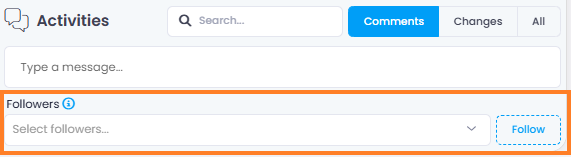
How to Become a Follower
There are three ways to become a follower of an element:
- Follow an element yourself — Open the element (task or planning element) and scroll to the Followers section at the bottom. Click the Follow button on the right side.
- Add other people as followers — In the Followers field, start typing a person's name or select it from the dropdown list.
- Automatic assignment via comments — When you are mentioned by name using @ in the comments section of an element, you are automatically added as a follower. If a group or role (e.g., the Team) is mentioned, all members of that group are added as followers individually.
Remove a Follower
To remove a follower, click the x icon next to their name in the Followers field.