Emails in Documents
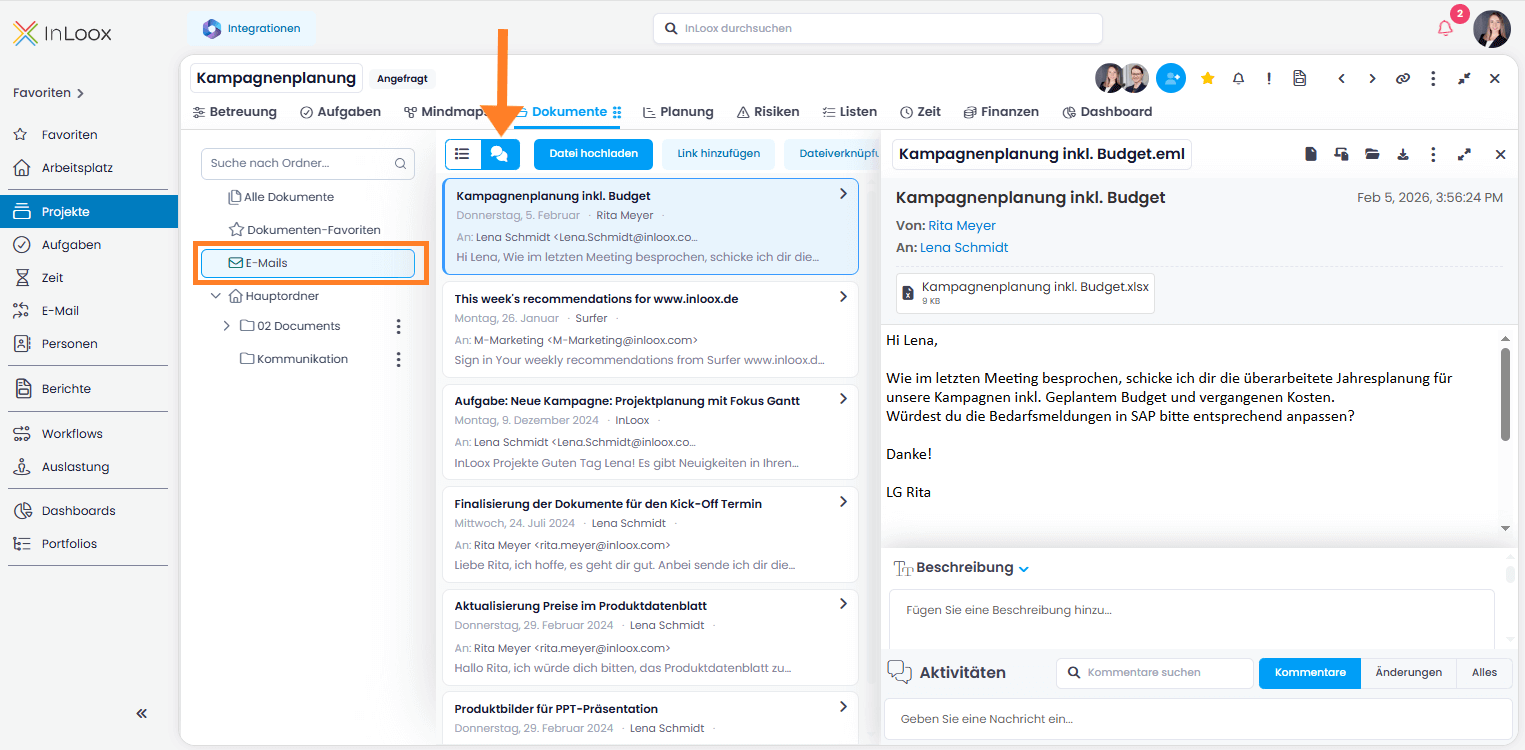
When you track emails as documents — either via the Email section in InLoox Web App or using the InLoox for Outlook add-in — all .eml files are automatically collected in the Emails folder within the project's Documents section, regardless of which other document folders they are located in.
There, you can choose between the list view and the conversation view.
Emails in List View in Documents
The list view is useful when you need to sort, filter or group emails. You can customize this list view with the following email-specific columns:
- Email CC recipients
- Email preview
- Email received on
- Email recipients
- Email sender
- Email subject
For further information on the list views in general and the columns available in the Documents list view, read the help article on list views.
Email Conversations in Documents
Click on the Conversation icon to show email conversations.
InLoox shows the latest email of each conversation at the top. Click on it to see the preview of the email on the right and scroll through the whole conversation. You can add a description, the document status or link it to other InLoox items. You can add a comment to the email and track changes made to this document such as who uploaded it to InLoox or deleted it.
For more information on how to track emails in InLoox Web App, read the help article on Track Emails (since InLoox 26).