Documents
The Documents section serves as a file repository within your projects, where you can store and manage documents and attachments as well as create folders.
You can find the Documents section within a project under the Documents tab:

Setting Up Folder Structure in New Projects
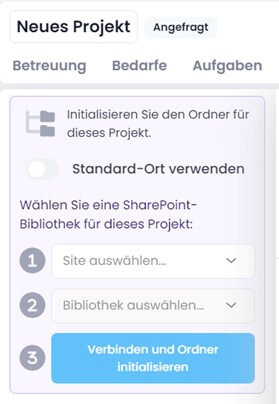
When you create a new project, you must initialize the folder structure first.
You can choose whether to use the default location defined in the settings or — if you have connected SharePoint Online — an individual SharePoint site and library (for example, a Microsoft Teams channel) as an alternative.
Make your choice and then click Initialize or Connect and initialize folder:
info
For more details on configuring your document storage, see the help article on InLoox Account Settings — Documents.
Topics
- Manage Folders and Move Documents — Create, rename, delete, and move folders and documents within the document structure.
- Upload, Edit, Comment or Delete Files — Upload files, preview and comment on documents, edit details, and manage favorites.
- Emails in Documents — View tracked emails in the Documents section using list or conversation view.
- Filter, Group and Sort Documents — Customize the document list using grouping, filtering, and sorting.
- SharePoint Integration — Synchronize documents, open SharePoint folders, change the document path, and display approval data.
- InLoox Desktop Tools — Open and edit documents from a file server, and add file links to locally stored documents.