InLoox LogoInLoox Logo
DocsLearn
English
  • English
  • Deutsch
WebOutlookTeamsMobileSelf-HostedAPI
  • Getting Started
  • Workplace
  • General Features
  • Projects
  • Project List
  • Tasks
  • Documents
  • Email
  • Time Tracking
  • Planning
  • Mind Maps
  • Lists
  • Views
  • AI Assistant
  • Workload
  • Financials
  • Reports & Dashboards
    • Reports
    • Report Designer
    • Dashboards
    • Dashboard Designer
      • Create a Dashboard
      • Provide Data
      • Add Dashboard Items
      • Bind Dashboard Items to Data
      • Dashboard Item Settings
        • Chart
        • Scatter Chart
        • Grid
        • Pies
        • Cards
        • Gauges
        • Pivot
        • Choropleth Map
          • Providing Maps
          • Providing Data
          • Delta
          • Map Navigation
          • Interactivity
          • Labels
          • Legend
        • Geo Point Maps
        • Range Filter
        • Date Filter
        • Images
        • Text Box
        • Treemap
        • Filter Elements
        • Dashboard Item Group
        • Tab Container
      • Data Shaping
      • Interactivity
      • Appearance Customization
      • Data Analysis
      • Convert Dashboard Items
      • Dashboard Layout
      • Undo and Redo Operations
      • Save a Dashboard
      • Open a Dashboard
      • Exporting
      • UI Elements
  • Risks
  • Portfolio
  • People & Contacts
  • Integrations
  • Personal Settings
  • Admin Settings
  • Help & Support
  • Reports & Dashboards
  • Dashboard Designer
  • Dashboard Item Settings
  • Choropleth Map
  • Legend

Legend

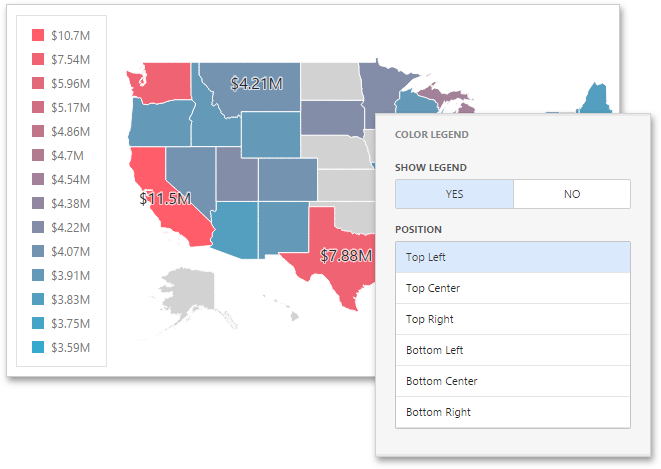
A legend is an element of a map that shows values corresponding to each color.

To display a legend within a map, open the Choropleth Map's Options menu and go to the Color Legend section.
wdd-choropleth-map-legend

The following options are available.

OptionDescription
Show LegendAllows you to control the visibility of legend.
PositionSpecifies the legend's position on a map.
Previous
Labels
Next
Geo Point Maps
Copyright © 2001-2026 InLoox GmbH. All rights reserved.
Ask AI

Ask a question about InLoox documentation.

AI answers may contain errors.