Analyze InLoox Data in Power BI
With the InLoox Power BI template, you can directly analyze and visualize InLoox data in Microsoft Power BI. Create individual reports and dashboards for your InLoox projects, enabling you to recognize trends in time and make better decisions.
Prerequisites
To use the InLoox Power BI template, you need:
- Power BI Desktop — Download from Microsoft's website
- Personal Access Token (PAT) — See Create Personal Access Token for step-by-step instructions.
Power BI File Security
The Power BI file will contain the token. If you share the Power BI file, remove the token beforehand to protect your data.
Connect to InLoox with the Power BI Template
- Download the InLoox Power BI template: PowerBIInLooxSample_2026-06.pbit.
- Open the template file in Power BI Desktop.
- When you open the template, you will be prompted to enter connection parameters:
- For WebAppUrl, enter the URL of your InLoox system:
- For InLoox Cloud:
https://app.inloox.com - For InLoox Self-Hosted:
https://inloox.meinfirma.de
- For InLoox Cloud:
- For ApiToken, enter your previously created Personal Access Token.
- For WebAppUrl, enter the URL of your InLoox system:
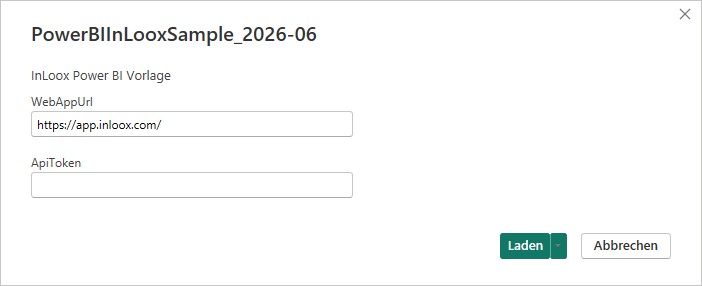
- Click Load.
- The data connection is established and you can start building your reports and dashboards.
tip
The template provides pre-configured data connections and data models, so you can focus on creating visualizations and reports without setting up the data integration from scratch.