InLoox AI
Since InLoox 26.5, the InLoox AI area in Account Settings controls all AI features for your account. You can allow or block AI support and connect your own AI model.
You need administrator permissions for your InLoox account to configure InLoox AI. See Permissions.
Allow AI assistance
- In InLoox, click your profile picture in the upper-right corner.
- Click Account Settings.
- In the left menu, click InLoox AI.
- Enable the Allow AI assistance slider.
AI assistance is enabled by default. If you disable it, the AI features are unavailable to every user in the account.
Connect a Custom LLM
By default, the AI features run on the InLoox default model. That model is available in the InLoox Cloud only, which is why the AI features used to be limited to the cloud editions.
Instead, you can route all AI features through your own OpenAI-compatible endpoint. Every InLoox edition can do this, and for InLoox Self-Hosted it is the only way to use the InLoox AI features.
Connecting your own model is released as a beta feature in InLoox 26.5. The range of functions and the configuration options may still change. During the beta phase, the AI features with your own model can be used without limits and free of charge.
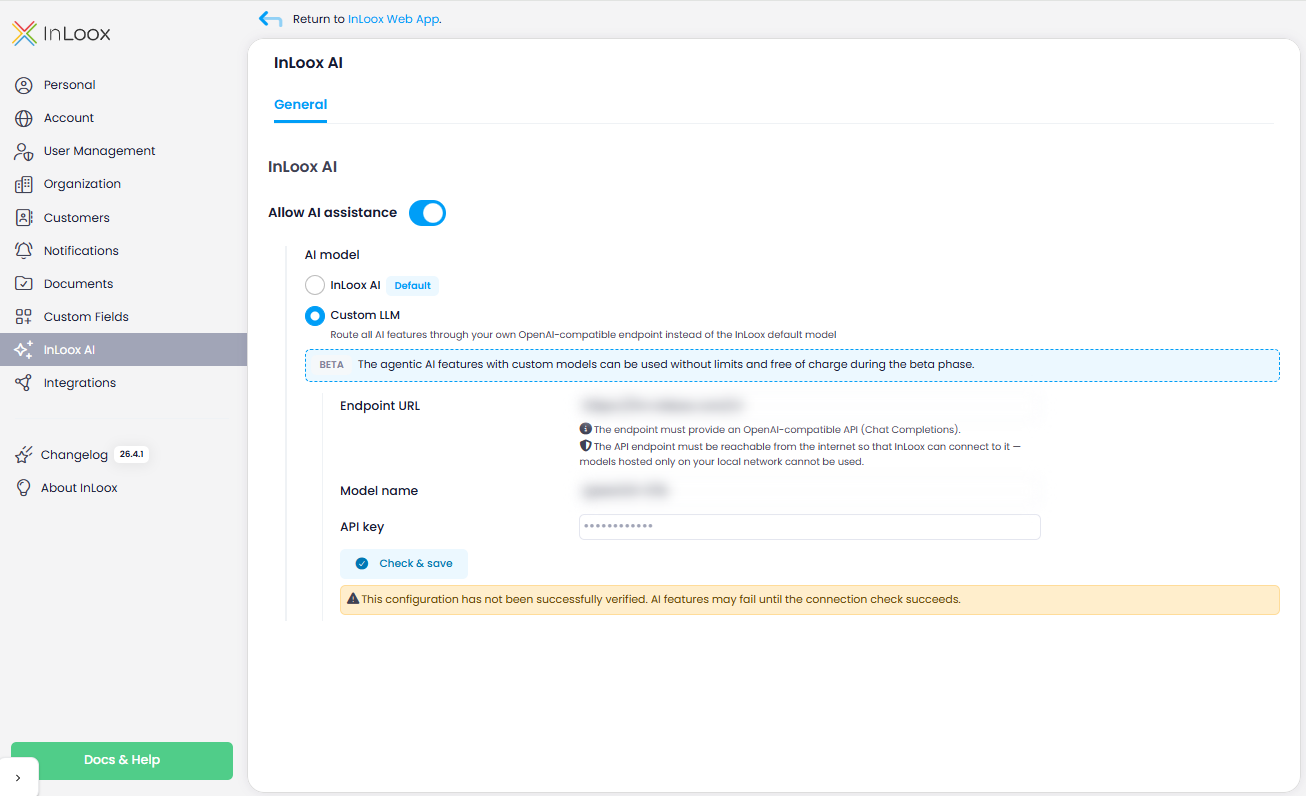
Under AI model, the option InLoox AI with the Default label is selected. To use your own model instead:
- Select Custom LLM.
- Fill in the fields that appear:
- Endpoint URL — the address of your OpenAI-compatible API.
- Model name — the model that InLoox requests at that endpoint.
- API key — the key InLoox authenticates with.
- Click Check & save. InLoox tests the connection and saves the configuration.
The endpoint must provide an OpenAI-compatible API (Chat Completions). How it has to be reachable depends on your edition:
- Cloud editions: The endpoint must be reachable from the internet so that InLoox can connect to it. Private-network targets are blocked (for example local network ranges, localhost, and link-local metadata addresses). Models that are hosted on your local network only cannot be used.
- InLoox Self-Hosted: The endpoint must be reachable from the application server that runs InLoox. A model in your own network can be used as long as that server can reach it.
As long as the connection check has not succeeded, InLoox shows the message This configuration has not been successfully verified. AI features may fail until the connection check succeeds. In that case, check the endpoint URL, the model name, the API key, and whether the endpoint can be reached as described above. For the Check & save test, InLoox also applies a rate limit of 10 checks per hour per account.
Changes can take up to 2 minutes to take effect.
Data privacy
When you use the InLoox default model, the AI functionality is provided by Microsoft's Azure OpenAI service, with data centers located within the European Union:
- A supplemental agreement with Microsoft ensures that the data provided is neither recorded nor used for model training.
- Azure OpenAI processes data only at the time of the request and does not store it permanently.
- InLoox data is not used for model training.
These guarantees cover the InLoox default model. If you connect a Custom LLM, InLoox sends the data to the endpoint you configured, and the terms of that provider apply.
For an overview of what the AI features can do, see InLoox AI Assistant.